HTML email is now fully supported by the PDF encryption module

Before discussing the new HTML feature, first a quick overview of the PDF encryption functionality provided by CipherMail gateway and Webmail Messenger.
PDF messenger
With the PDF encryption module (PDF Messenger), the complete email, including all attachments, is converted into a password-protected PDF. The password-protected PDF is then sent to the recipient. The recipient can open the PDF using a standard PDF reader.
PDF messenger is an easy-to-use alternative to S/MIME or PGP encryption because the recipient only needs a PDF reader. PDF messenger supports different methods of getting the password to the recipient:
- Use a pre-defined static password.
- Randomly generate a password. The password will be sent back to the sender of the message.
- Randomly generate a password. The password will then be sent by SMS Text to the recipient.
- Generate a one time password (OTP).
- Sender specified password.

PDF messenger features
- The PDF is encrypted with AES128.
- Attachments are embedded within the encrypted PDF.
- The original email can be attached (as .eml file)
- The recipient can reply by clicking the reply button.
- Full Unicode support.
- HTML email is supported, including embedded images [new]
- PDF template is fully configurable [new]
HTML support
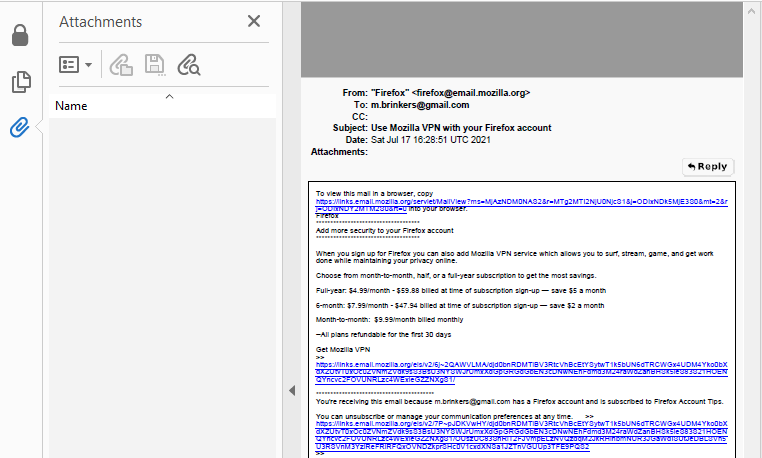
Previous releases of PDF messenger only supported text based emails. If the email contained a text part, the text part was used. If the email did not contain a text part, the HTML part was converted to text.
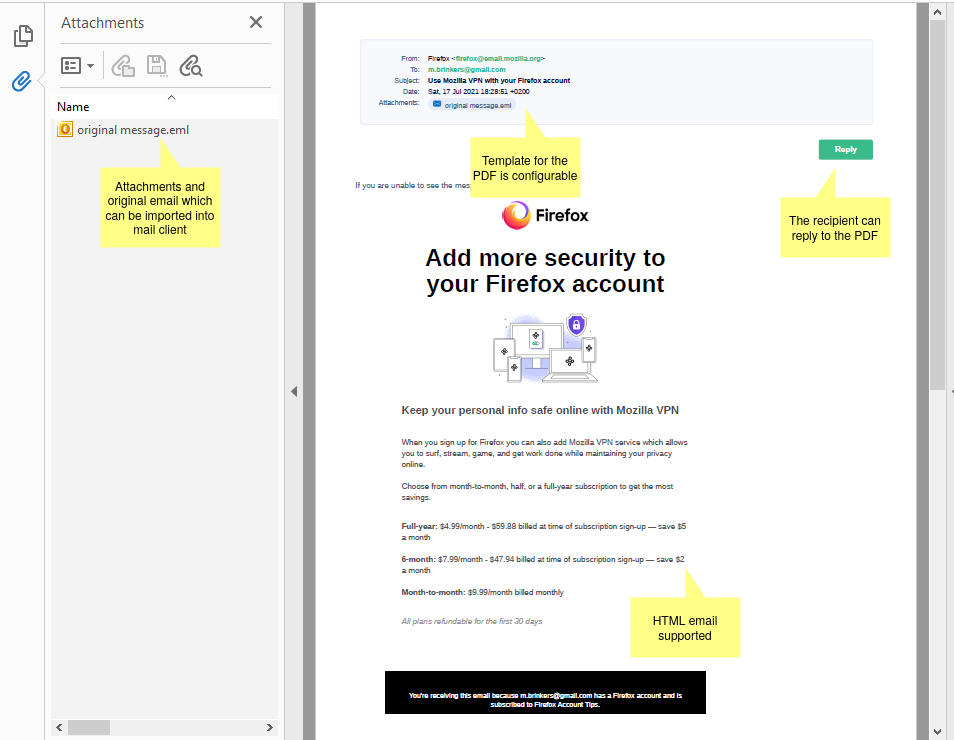
Since version 5.1.3 of the Gateway (professional edition) and version 4.1.3 of Webmail Messenger, HTML email is now fully supported. The encrypted PDF now contains all markup and all inline images. The encrypted PDF looks exactly like the source email.
The template for the encrypted PDF is fully configurable. This allows you to match the corporate identity.
To give you an example of how the new PDF with HTML support looks like compared to the text only version, we have included two screenshots of the encrypted PDF. One as generated by the Gateway professional (which has support for HTML parts) and the other was generated by the community edition (which has only support for text parts). Both were generated using the same email.
Clearly, the HTML supported version is much more appealing.
Encrypted PDF with HTML support
Encrypted PDF with only text support
Future developments
We are working hard on providing additional features for PDF messenger. Some of the features we are currently working on:
- Digital signing of the encrypted PDF.
- Provide an Android and IOS app which can be used to generate the password for the PDF (using the HOTP algorithm).