S/MIME
S/MIME relies on Public Key Infrastructure (PKI). PKI is a technology that enables the secure exchange of information over untrusted networks using public key cryptography. PKI employs X.509 certificates to associate a public key with a specific identity. S/MIME adopts a hierarchical trust model in which trust is established from the bottom up. The root of the trust hierarchy is accepted without verification, and all intermediate and leaf certificates (representing end users and intermediaries) are trusted because they descend from this trusted root.
Within PKI, the trust chain from the root to the end-user certificate is formed by a sequence of signed certificates. The root certificate signs an intermediate certificate, and the intermediate certificate signs the end-user certificate. Certificates are signed using the issuer’s private key. If any part of a certificate is modified after it has been signed, the digital signature becomes invalid, rendering the certificate unusable.
S/MIME is an open standard as defined in RFC 8551, and it is broadly supported across a wide range of platforms.
X.509 certificate
An X.509 certificate typically includes a variety of fields that help identify its purpose, validity, and ownership. The following elements are commonly found in an X.509 certificate (this list is not exhaustive):
- Public Key
The cryptographic public key associated with the certificate
- Subject
The entity (such as a user, computer, or organization) to which the certificate is issued.
- Email Address:
An email address tied to the subject, helping to uniquely identify the entity.
- Issuer
The Certificate Authority (CA) that issued and signed the certificate.
- Serial Number
A unique number assigned by the issuer to distinguish this certificate from others.
- Not Before
The date and time before which the certificate is not considered valid.
- Not After
The date and time after which the certificate expires and is no longer valid.
- Key Usage
Specifies the intended cryptographic uses of the public key, such as digital signature or key encipherment.
- Extended Key Usage
Defines additional uses for the public key, such as server authentication or client authentication.
These fields are used by systems and applications to verify the identity of entities, control certificate validity periods, and determine the ways in which a certificate can be used. Some of the main elements of an X.509 certificate will be discussed.
Public Key
The public key is a component of a cryptographic key pair, consisting of a public and a private key. It is the non-confidential, shareable part, intended to be distributed freely to others. External parties use the public key in two primary ways: to verify digital signatures and to encrypt messages. When a sender wants to encrypt data for a recipient, they use the recipient’s public key, ensuring that only the intended recipient, who holds the matching private key, can decrypt the message. Similarly, to authenticate the origin and integrity of a message, recipients can use the public key to verify the sender’s digital signature. The security of these operations depends on keeping the private key confidential while allowing anyone to use the public key.
Subject
The subject field of a certificate identifies the entity the certificate was issued to. This typically includes attributes such as the owner’s name. In addition, the subject field may contain one or more email addresses associated with the certificate owner. Including email addresses is common for certificates intended for secure email use. The subject field allows applications to programmatically verify the identity and contact information of the certificate holder. Other attributes in the subject, such as organization or location, may also be present, depending on the use case and certificate profile.
Email address
The email address associated with the certificate recipient. A single certificate can include multiple email addresses. Email addresses may be present in different parts of the certificate, such as the subject distinguished name or the subject alternative name extension. These email addresses identify the intended owner(s) of the certificate for purposes such as secure email communication and authentication. When verifying a certificate, it is important to consider all listed email addresses to ensure proper validation of the certificate user’s identity.
Issuer
The issuer field contains the distinguished name of the entity that issued this certificate. In most cases, this will refer to a Certificate Authority (CA) that has signed and issued the certificate. For root certificates, the issuer and subject are the same because root certificates are self-signed; that is, they are signed by their own private key and are at the top of the certificate trust hierarchy. Understanding the relationship between issuer and subject is essential for validating certificate chains and establishing trust in secure communications.
Serial Number
Each certificate must include a serial number. This serial number must be unique for each issuer; in other words, an issuer must never create more than one certificate with the same serial number. The combination of the issuer’s identity and the certificate’s serial number serves as a unique identifier for the certificate. This means that even if two issuers use the same serial number in their certificates, the certificates can still be distinguished because the issuer is different. This unique identification is important for tasks such as certificate revocation and management.
Not Before
The date before which the certificate cannot be considered valid. Any attempts to use the certificate before this date will fail validation checks and the certificate will be rejected as not yet valid. This “not before” date is set by the certificate issuer and defines the earliest moment when the certificate is trusted for its intended purposes, such as authentication or signing. Ensure that the system date and time are correct to avoid accidental rejection of certificates that are not yet valid or already expired.
Not After
The date and time after which the certificate is considered expired and should not be trusted for authentication or encryption purposes. After this date, systems relying on the certificate may reject it, and renewed or replaced certificates may need to be issued to maintain secure communication.
Key Usage
A public or private key can serve several functions. For instance, a private key might be used to generate digital signatures or to decrypt data. However, a certificate issuer may wish to limit how a key is used by specifying certain key usage restrictions. The commonly recognized key usage types include:
- digitalSignature
Allows the key to be used for verifying digital signatures.
- nonRepudiation
Ensures the key can be used for actions that require proof of origination, preventing the signer from denying involvement.
- keyEncipherment
Permits the key to encrypt other keys, often in the process of exchanging session keys.
- dataEncipherment
Enables the key to directly encrypt user data.
- keyAgreement
Allows the key to establish session keys, typically during key exchange protocols.
- keyCertSign
Authorizes the key to sign certificates, usually in the context of a Certificate Authority.
- CRLSign
Permits the key to sign Certificate Revocation Lists.
- encipherOnly
Restricts the key’s use to only data encryption as part of key agreement.
- decipherOnly
Restricts the key’s use to only data decryption as part of key agreement.
If a certificate does not specify any key usage, the associated key is generally considered valid for all possible uses. For S/MIME encryption, it is required that the key usage include at least the keyEncipherment permission, if any usage constraints are set. For S/MIME signing, the key usage should include at least digitalSignature or nonRepudiation if key usage restrictions are present.
It’s important to note that improper key usage settings may cause security applications to reject a certificate. Always ensure the key usage attributes in a certificate are appropriate for the intended application.
digitalSignature vs nonRepudiation
Non-repudiation provides a higher level of assurance than a standard digital signature. In the context of digital certificates, the nonRepudiation attribute indicates that the certificate is intended to be used for processes where the signer cannot reasonably deny their involvement. Typically, certificates with the nonRepudiation flag should be qualified certificates and are recommended to be stored on secure hardware devices, such as smart cards or hardware security modules (HSMs). This added security helps protect the private keys from unauthorized access and ensures the legal validity of critical digital transactions.
Extended Key Usage
The extended key usage extension, when present in a certificate, defines specific purposes for which the certificate is intended to be used. This provides a finer level of control beyond the basic key usage extension, enabling administrators or applications to restrict certificates to certain roles or protocols. For example, a certificate could be limited to server authentication, client authentication, code signing, email protection, timestamping, OCSP signing, IPsec operations, or smart card login. By specifying extended key usages, certificate issuers can help ensure that certificates are only used in appropriate contexts.
If the extended key usage extension is not defined in a certificate, the key is considered usable for all purposes according to standard public key infrastructure (PKI) practices. When issuing certificates for S/MIME, if the extended key usage extension is present, it must at a minimum include either the anyKeyUsage or the emailProtection purpose. This ensures that the certificate is recognized as valid for secure email operations, such as signing and encrypting email messages.
Thumbprint
A thumbprint is not an actual field within an X.509 certificate, but rather a value derived from the certificate data itself. Specifically, a thumbprint is a cryptographic hash—commonly using algorithms such as SHA-256—computed over the binary encoding of the entire certificate. This hash produces a short, fixed-length string of characters that serves as a unique identifier for the certificate. Thumbprints are frequently used to quickly verify or reference certificates in systems where the full certificate data is not needed, helping ensure that each certificate can be reliably and uniquely identified.
Certificate store
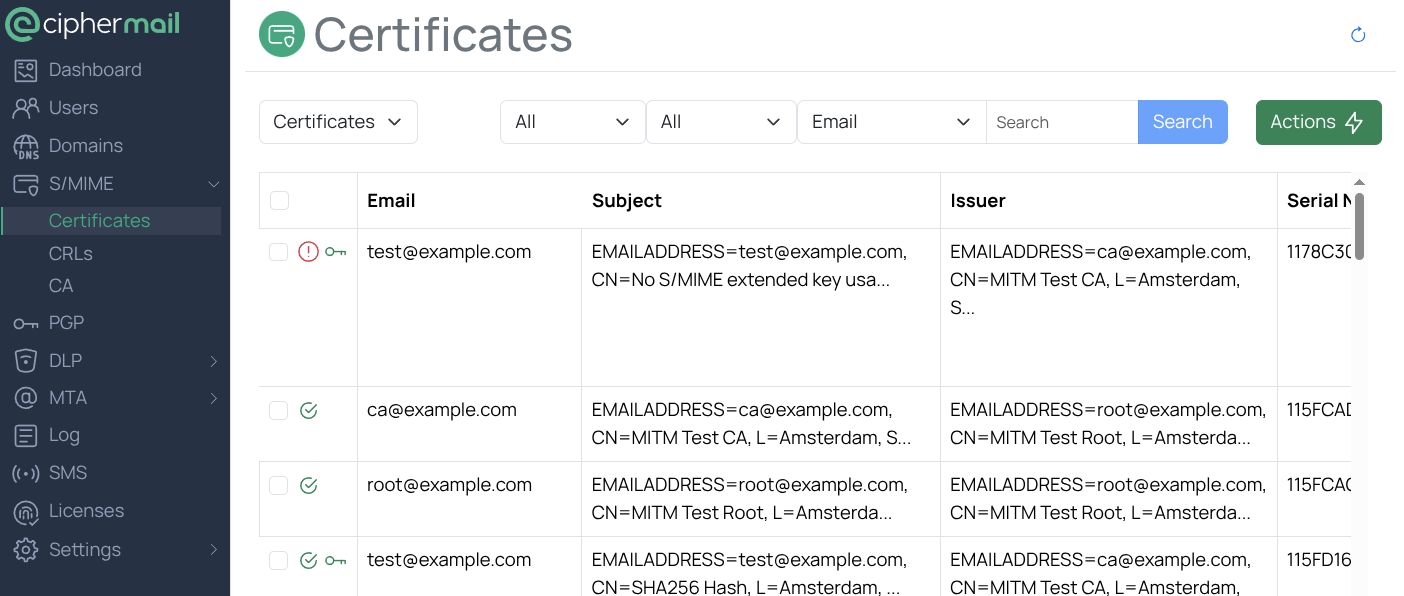
The certificate store maintains both end-user and intermediate certificates. End-user certificates, which are commonly issued to internal users, are used for digital signing and decryption purposes. Each of these end-user certificates typically has an associated private key, enabling secure operations such as signing messages or decrypting information.
You can add new certificates or keys to the certificate store through an import process. To import public certificates, use certificate files in formats such as p7b, cer, or pem. You can do this by selecting the Import certificates action.
If you need to import certificates that also contain private keys, use files in pfx or p12 format. These can be imported using the Import keys action. It is important to store private keys securely, as they are essential for cryptographic operations and must not be accessible to unauthorized users.
Each certificate can be in one of several states: valid, invalid, or revoked. To view the details of a certificate, including information such as issuer, expiration date, and usage constraints, click the certificate’s Subject field in the interface. If a particular certificate is not trusted, you can check the certificate’s Info field for more details about the trust status and reasons for distrust, such as an expired certificate, mismatched issuer, or revocation.
Root store
The root store holds all trusted Certificate Authority (CA) root certificates used by the system to verify and establish trust in digital certificates. By default, the gateway does not include any root certificates in its root store. To enable trusted connections, you must manually import root certificates. This can be done by selecting the Import certificates option. Imported root certificates are essential for validating the authenticity of server and client certificates during secure communications.
Tip
- A default set of system trusted root certificates can be imported by running the cli command:
ciphermail-cli certificate import system-roots
Revocation checking
If a certificate becomes compromised or should no longer be trusted for any reason, it must be revoked to prevent its further use. Certificate revocation involves placing the certificate on a Certificate Revocation List (CRL). A CRL is a list maintained and published by a Certificate Authority (CA), detailing certificates that are no longer valid. The CRL is updated and distributed periodically to ensure up-to-date revocation information is available to all clients and systems that rely on digital certificates.
After a certificate appears on the CRL, it should not be used under any circumstances. Common reasons for revocation include key compromise, CA compromise, changes in the holder’s affiliation, cessation of operation, or other reasons as defined by the CRL standard.
Periodic CRL update
The gateway routinely scans the list of Certificate Authority (CA) certificates for Certificate Revocation List (CRL) distribution points. By default, this scan occurs every 6 hours. During each scan, the gateway attempts to download the latest CRL from the URLs specified in the CRL distribution points section of each CA certificate. If the gateway successfully downloads a new CRL, it replaces the previous version in the CRL store.
Tip
If a certificate authority (CA) has issued a certificate but does not maintain a Certificate Revocation List (CRL), an alternative method for revoking the certificate is to add it to the Certificate Trust List (CTL). A CTL is a predefined list maintained by an administrator that contains certificates which are either explicitly trusted or explicitly untrusted. Including a certificate on the CTL allows systems to recognize the certificate as untrusted, even if a CRL is not available for that CA.
Certificate selection
The gateway automatically selects the appropriate certificates for both signing and encryption operations. Certificates are only used if they meet strict validity requirements: they must be trusted, not expired, not revoked, and fit for the intended use. To be considered trusted, a certificate must have a valid trust chain up to a recognized root certificate authority. This means the root certificate authority must be installed in the system’s root store. Certificates failing any validity checks, such as expiration or revocation, will not be used by the gateway.
Encryption certificate selection
Encryption certificates can be assigned either to individual users or to an entire domain, depending on organizational needs. To manage these assignments, navigate to the preferences page for a user or domain and select . This will open the encryption selection page.
On this page, you will see a list of all encryption certificates currently selected for the user or domain. By default, when a user was selected, the system only displays certificates that include email addresses matching the user.
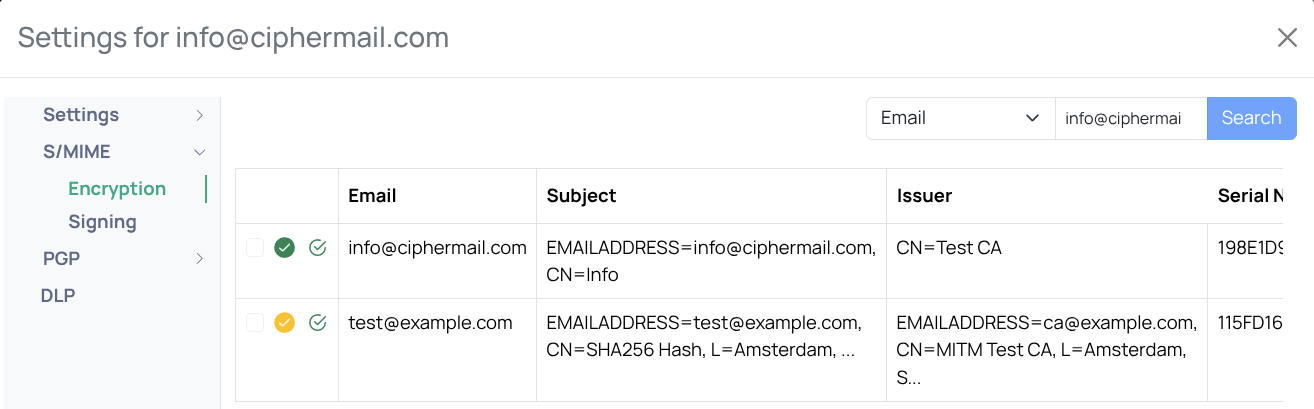
Users can have any number of certificates linked to their account. The system will try to choose the correct certificate automatically, following strict PKI rules. A certificate is selected automatically only when the email address on the certificate matches the user’s email address. If no certificate is selected automatically, for example, because the addresses do not match, an administrator can manually choose a certificate to use for that user.
When an email is sent with S/MIME encryption, all selected certificates for the recipient are used. This ensures the recipient can open the message with any matching private key they own. The benefit is flexibility: the recipient can decrypt the email with different keys on different devices. For example, a key stored on a home computer can be used when reading the email at home, while a key on an office computer can be used when reading it at work.
Certificates can be manually selected and deselected by selecting the certificate checkbox and clicking Save. Automatically selected certificates cannot be deselected. The certificate can be completely removed if the certificate is no longer required. Alternatively you can deselect the advanced S/MIME setting “Auto select certificates” for the user if automatic selection of certificates for the user is unwanted.
Selecting a certificate manually does not guarantee it will be used for encryption. If the certificate is not valid, it will be ignored even if you select it. A selected or automatically selected certificate is also ignored if its key type (RSA or EC) is disabled for encryption for the recipient with the RSA Encryption or EC Encryption setting, although it is still shown as selected.
To use a selected certificate, ensure it is valid. The steps depend on why it is not trusted:
If the certificate chain is incomplete or invalid, import the required root and intermediate certificates.
If you cannot complete the certificate chain, you can whitelist the certificate by adding it to the Certificate Trust List (CTL).
Signing certificate selection
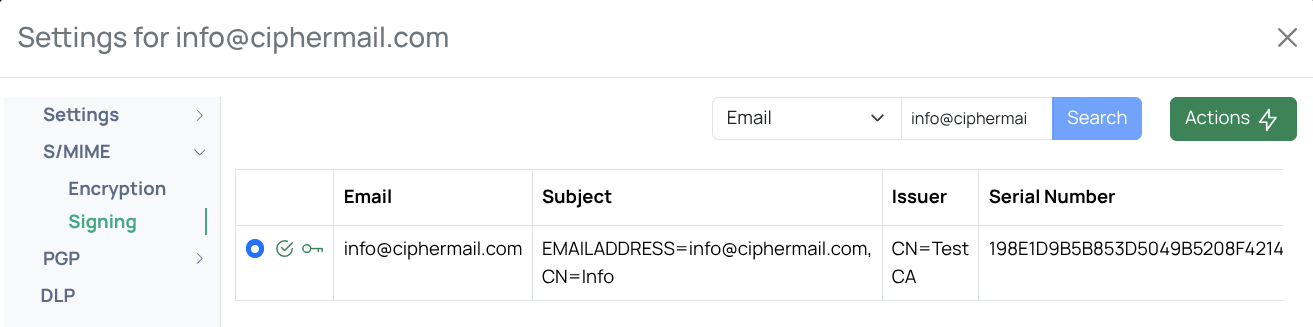
You can select a signing certificate for an individual user or for a domain. To open the Select signing certificate page, go to the preferences page and choose Select signing certificate from the S/MIME menu () This page displays the certificate currently selected for the user or domain. By default, only certificates whose email address matches the user or domain will be shown.
Only certificates that include a private key can be selected, and each user can have only one signing certificate selected at a time. The system will try to choose a signing certificate automatically by looking for a valid certificate that matches the user’s email address. If more than one certificate is suitable for signing, the first one found will be selected.
An administrator can override the automatic selection by manually choosing a different certificate. If a certificate was selected manually, you can return to automatic selection by selecting .
CRL
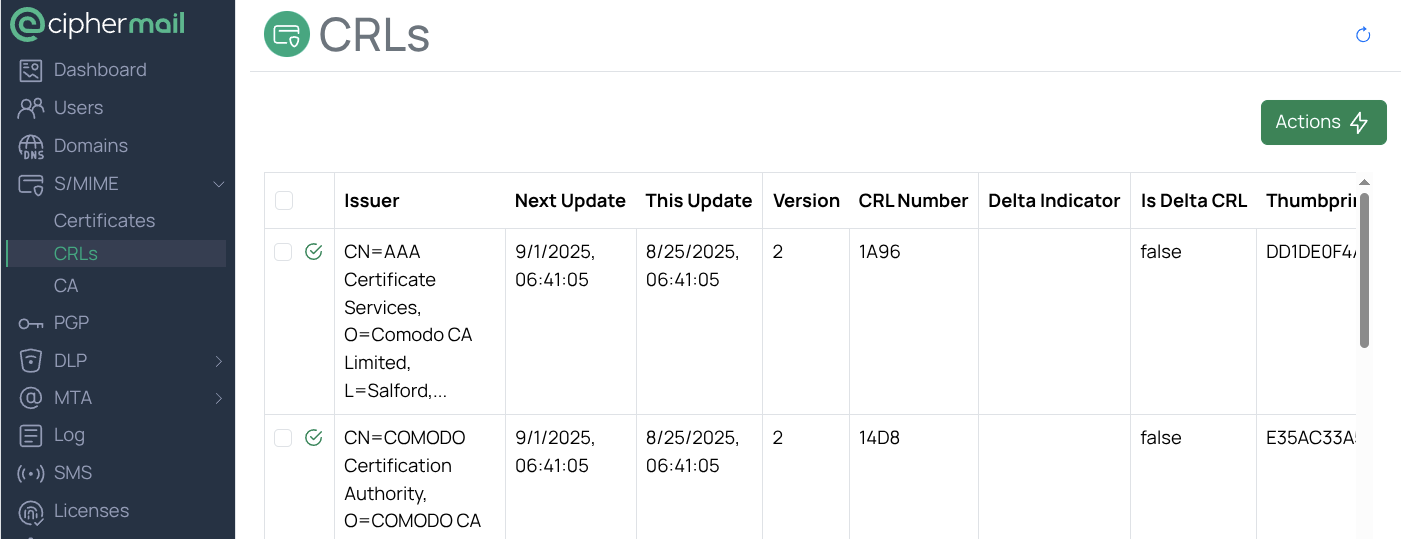
A Certificate Revocation List (CRL) is a list of digital certificates that have been revoked and must no longer be trusted. Most Certificate Authorities (CAs) make their CRLs available on the internet via HTTP or LDAP. The web addresses (URLs) for these CRLs are included in certificates under the “CRL distribution points” extension. The gateway automatically checks all certificates every six hours to find these distribution points and download the corresponding CRLs. Downloaded CRLs are saved in the CRL store. You can also trigger an immediate update by selecting .
Revocation cache and download limits
A full certificate chain is built and checked for revocation for every S/MIME message. In a typical setup the messages are signed by a handful of issuers, so the same intermediate certificates would be checked against the same CRLs over and over again. Checking a certificate against a CRL is expensive: the CRLs of the issuer are read from the CRL store, decoded, and their signatures verified. With a large CRL, and some CAs publish CRLs of tens of megabytes, that costs a noticeable amount of processor time and memory per message.
The result of a check is therefore cached per certificate. An entry is not given a lifetime. It is removed when the CRL store is updated and when a CRL is imported or deleted, so a cached result never outlives the CRLs it was based on. A result is also dropped when a CRL revokes the certificate with a revocation date which lies in the future and that moment has arrived.
The most commonly changed settings can be set with an Ansible override file

sudo vi /etc/ciphermail/ansible/group_vars/all/override.yml
Add the following YAML and change the values to match your requirements:
# the number of certificates for which the revocation status is cached
ciphermail_backend__revocation_result_cache_maximum_size: 10000
# the summed size in bytes of the decoded CRLs which are kept in memory
ciphermail_backend__parsed_crl_cache_maximum_size: 100000000
# the maximum size in bytes of a downloaded CRL
ciphermail_backend__http_crl_download_handler_max_crl_size: 26214400
ciphermail_backend__ldap_crl_download_handler_max_crl_size: 26214400
After changing the Ansible override file, run the playbook:
sudo cm-run-playbook
The full set of settings is listed below. The ones without an Ansible variable
can be set by adding them to a YAML file in a subdirectory of
/etc/ciphermail/spring.config.d, for example
/etc/ciphermail/spring.config.d/custom/application.yml, followed by a
restart of the back-end.
Warning
Do not edit /etc/ciphermail/spring.config.d/backend/application.yml
itself. That file is generated by Ansible and any change to it is lost the
next time the playbook runs.
System property |
Ansible variable |
Default |
Description |
|---|---|---|---|
|
|
10000 |
The number of certificates for which the revocation status is kept. About 300 bytes are used per entry. Set to 0 to disable the cache. |
|
|
21600000 |
How often the CRLs are downloaded, in milliseconds, six hours by default. In a cluster it is also how long a node leaves the downloading to another one, see the note below. Set to 0 or less for no scheduled update at all, only the ones which are asked for. Note that a node then never clears what it has worked out from the CRL store on its own either, because clearing it is part of an update, so on a cluster a CRL which another node adds is not used by this one until an update is asked for or its caches are cleared. |
|
|
0.125 |
The part of the heap which the revoked serial numbers kept in memory may
take together. Worked out every time the back-end starts, so it follows
the machine it is running on. The heap is
|
|
|
-1 |
The heap in bytes which the revoked serial numbers kept in memory may take together, said exactly rather than as a part of the heap. Negative, which is the default, means work it out from the fraction above. An entry costs 29 bytes per revoked certificate plus a kilobyte, so a CRL of a million of them takes about 29MB and one of a thousand about 30kB. Allow enough for all the CRLs which are regularly checked against, see the note below. This is a limit and not a reservation. Set to 0 to disable. |
|
|
26214400 |
The maximum size in bytes of a CRL downloaded over HTTP. A larger CRL is not downloaded. |
|
|
26214400 |
The maximum size in bytes of a CRL downloaded over LDAP. |
Note
Do not set ciphermail.parsed-crl-cache.maximum-size smaller than the
CRLs which are really in the store. A CRL which does not fit is never kept,
and one which is evicted is read, decoded and verified again on the next
check, which for a large CRL costs several hundred megabytes at once. A
cache slightly too small for what is in the store is worse than one which is
larger than it needs to be, because the limit is only ever reached by what
is there.
ciphermail.parsed-crl-cache.maximum-size is capped at a quarter of the
heap of the back-end, whatever it is set to. The heap is a percentage of the
memory of the machine, so the same number of bytes is modest on a large
machine and most of the heap on a small one. When the cap applies it is
written to the log. Raising the memory of the machine raises the cap with it.
The two download limits are not capped in this way, and they do not behave
the same. A CRL downloaded over HTTP is written to disk once it grows past
ciphermail.http-crl-download-handler.mem-threshold, so raising the HTTP
limit costs disk rather than heap. A CRL downloaded over LDAP is held in
memory in full before its size is looked at, so raising the LDAP limit
raises what a download can hold at once.
Note
What is kept is not the CRL but the serial numbers of the certificates it revokes, which takes about two thirds of the size the CRL has in the store: a CRL of 47 MB needs roughly 29 MB of this setting. A CRL which does not fit is never kept at all and is then read, decoded and verified again for every certificate checked against it.
A CRL is also kept or dropped by how often it is used, not by what it costs to decode, so a large CRL gets no preference over a small one. If the CRLs which are regularly checked against do not all fit together, a large CRL which is used less often than the others is dropped and has to be decoded again, and that is the most expensive CRL to decode. Sizing this too low costs slightly more than leaving the cache off, because a CRL which is never kept is then read with one query for the thumbprints and one query per CRL, where a single query used to return everything.
Note
In a high-availability cluster each node has its own cache. The CRL store is
shared through the database, but what a node has worked out from it is not, so
a CRL which one node downloads or imports is not used by the other nodes until
they next look, which is at most ciphermail.crl-store-update-interval, six hours by
default, and never when that is set to zero or less. A node clears what it worked out both when it updates the CRL store
itself and when it finds that another node has just done it, so the bound holds
whichever of the two happens. Revocation through CRLs is
periodic by nature, so for the CRLs the gateway downloads by itself this is
within the staleness the CRLs already have. Use OCSP where the status has to be
current.
A CRL which an administrator imports or deletes is different: it is usually
meant to take effect now. Run ciphermail-cli crl invalidate-caches on each
of the other nodes and they throw away what they worked out and pick the change
up on the next message. It downloads nothing, so it returns at once, unlike
refreshing the CRL store.
It reports what the caches of that node were holding just before they were cleared, so there is no need to go to the log for it:
{
  "revocationResultCache": {
    "entries": 412,
    "hits": 98314,
    "misses": 517
  },
  "parsedCRLCache": {
    "entries": 3,
    "bytes": 29360128,
    "hits": 97903,
    "misses": 3
  }
}
The hits and the misses are counted since the back-end started and are not reset by clearing, so they say how much use the caches have been over the life of the process. The entries are what there was at the moment of clearing. The revocation results have no size because that cache is bounded by how many entries it holds rather than by what they take.
To watch these numbers rather than act on them, use
ciphermail-cli crl cache-statistics or GET /api/crl/getCacheStatistics,
which say the same thing and change nothing. Clearing the caches to read them
would set the counts back to nothing on every reading and make the node read
and verify every CRL again, so a monitor must use this one.
It has a permission of its own, crl:get-cache-statistics, so an account
which is only there to watch the gateway can be given it without being able to
clear anything: clearing needs crl:refresh-crl-store.
Use the CLI on each node rather than the button in the administration console.
The console is normally reached through a load balancer, so there is no saying
which node handles the request, and pressing the button several times can reach
the same node every time. The button is there for a gateway which is reached
directly. The same goes for POST /api/crl/invalidateCaches: it acts on
whichever node receives it.
The nodes also keep out of each other’s way when downloading. A node which is
about to start a scheduled update leaves it be when another node finished one
less than ciphermail.crl-store-update-interval ago, so a scheduled update usually
downloads the CRLs once for the cluster rather than once per node. A node says it has
finished and never that it is about to start, so two nodes which come due within one
run of each other still both download; they are pulled apart over the following cycles. It then looks again when the store is
next due rather than a whole interval later, so the CRLs are never left longer
than the interval whichever node does the work. An update which an
administrator asks for is always done.
A node records only that it has finished, never that it is about to start. A node which fails, is restarted, or stops altogether therefore leaves nothing behind which could keep the other nodes from downloading, which is the failure worth avoiding. The cost is that two nodes which wake within one run of each other both download, which is only wasteful.
Note that a node always updates the CRL store once shortly after it starts, whatever any other node has been doing, because restarting the back-end is how an administrator makes a gateway try again after fixing whatever kept it from downloading. Nodes which are started together therefore each download once. It is only the scheduled updates after that which are done by one node on behalf of the cluster.
Note
Raising a max-crl-size also raises what a download can cost. The CRL is
written to a temporary file above the mem-threshold, but it is still
decoded in memory before it is stored, so raise the memory of the back-end
along with it.
CTL
With S/MIME, certificate trust follows Public Key Infrastructure (PKI) rules. If the full certificate chain to a trusted root is not available, the certificate will not be trusted.
The CipherMail Gateway lets you manually mark a certificate as trusted or distrusted. To do this, select the certificate and choose Trust or Distrust from the selection menu.
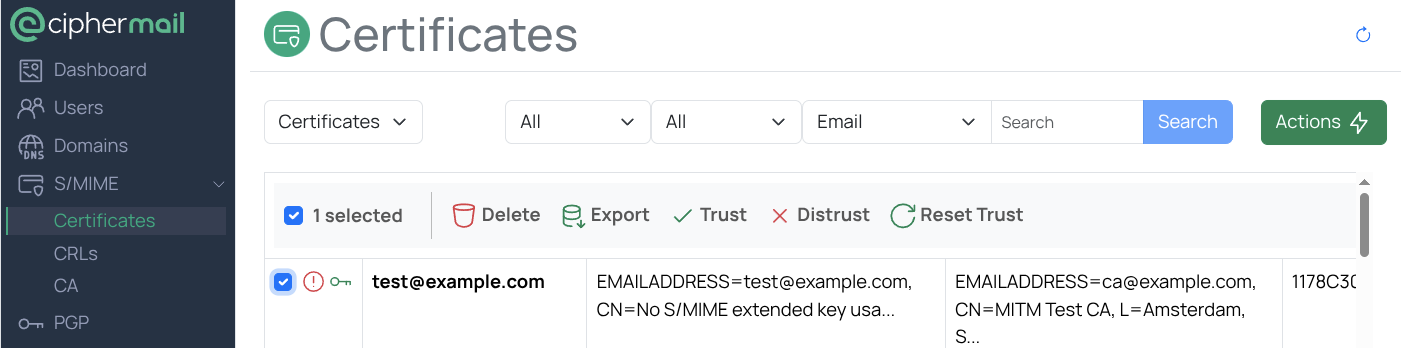
Examples of when explicitly marking certificates as trusted or distrusted is helpful:
A certificate has been compromised and must no longer be used, but the issuing certificate authority does not publish a certificate revocation list (CRL). In this case, add the certificate to the Certificate Trust List (CTL) as distrusted (blocklist).
A certificate appears invalid because the required root certificate is missing, but the administrator has independently verified that it is legitimate (for example, by confirming the thumbprint over the phone). In this case, add the certificate to the CTL as trusted (allowlist).
To restore the default PKI trust validation, select the certificate, then choose Reset Trust.
Intermediate certificates
When you mark and intermediate certificate as untrusted, every certificate it has issued, both directly and through any lower-level intermediates, will also be treated as untrusted.
Trust does not work the same way. If you mark an intermediate certificate as trusted, the certificates it issues are not automatically trusted. To trust a specific certificate, you must add that certificate to the Certificate Trust List (CTL) explicitly.
CA
Pending requests
Most certificate requests are not issued immediately. Requests that are not processed right away are placed in the Pending requests queue and handled in the background. To view or manage outstanding requests, open the Create new end-user certificate page and select Pending requests.
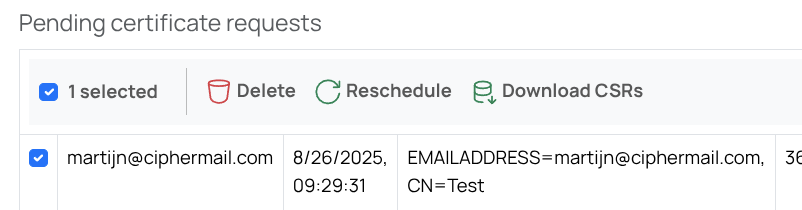
When you select a pending request, a menu appears with options to delete the request, reschedule it, or download the request.
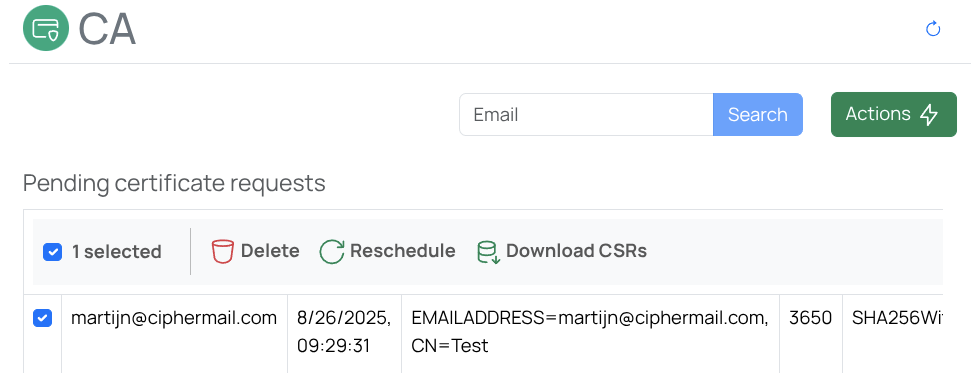
- Delete
Delete the selected pending requests
- Reschedule
Pending requests are processed periodically by their assigned request handler. To run selected items immediately, choose Reschedule selected.
- Download CSRs
If a request is generated by the CSR handler, the CSR can be downloaded.
Certificate Request Handlers
CipherMail Gateway includes a flexible, pluggable system for managing
certificate requests. You can add new certificate request handlers to integrate
with different internal or external certificate authorities (CAs). A certificate
request handler is responsible for creating and retrieving certificates and
their private keys. By default, the following handlers are available: Local CA,
CMP, CSR, CEMA , GlobalSign Atlas and SwissSign .
Attention
CipherMail integrates with external certificate providers, which may change their services or policies at any time. Such changes can affect the ability to request or manage certificates through CipherMail. While we aim to maintain compatibility and will make reasonable efforts to support these providers, continued operation depends on the provider’s willingness and ability to work with us. Support for external certificate providers is therefore offered on a best-effort basis, and CipherMail cannot be held responsible for disruptions or limitations caused by changes outside our control.
Local CA
The gateway includes an integrated certificate authority (CA) that issues end-user certificates for both internal and external users. This simplifies S/MIME setup and removes the need to rely on a third-party CA.
Note
External email clients will not trust certificates issued by the built-in certificate authority (CA) until you import its root certificate.
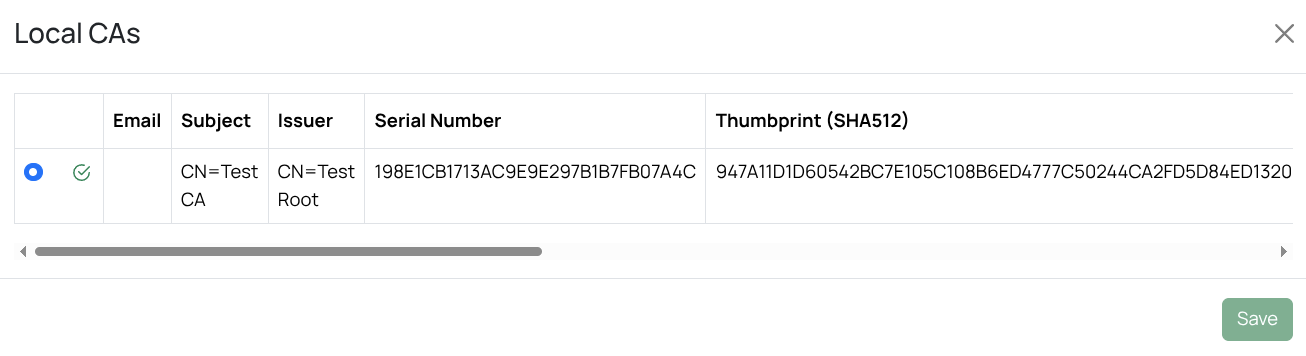
The Local CA requires both a root certificate and an intermediate certificate. To create new root and intermediate certificates for the built-in CA, select .
After creating a new local CA, the new CA should be selected .
Note
Local CA offers only basic features. For advanced capabilities such as multiple CA profiles, OCSP, and similar functions, use a dedicated external CA.
CMP request handler
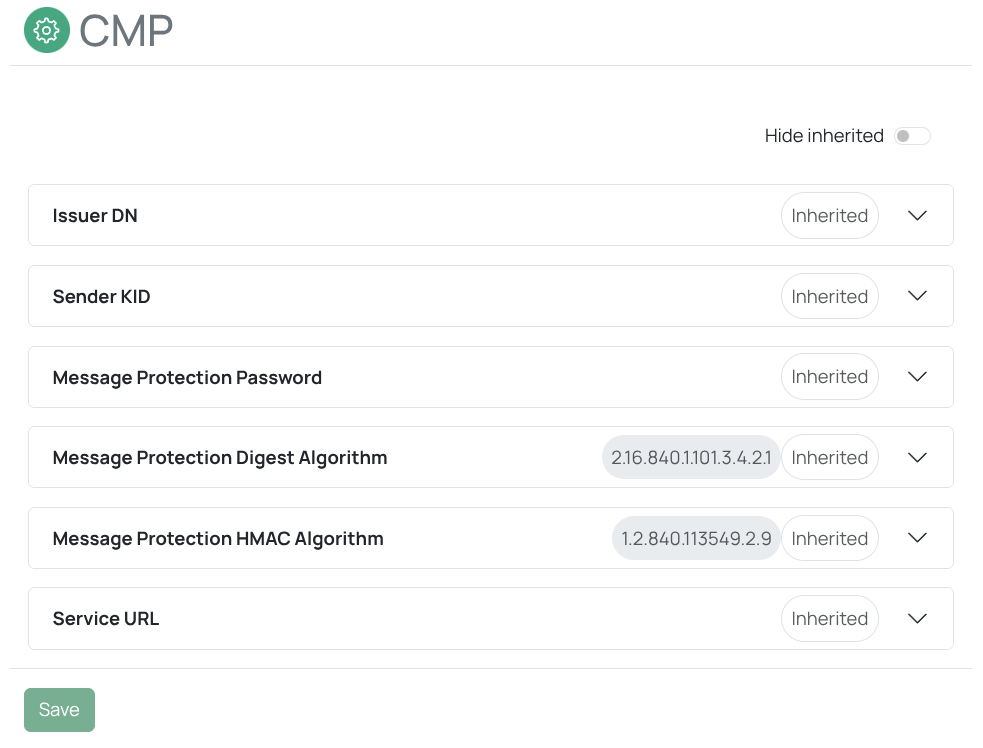
Certificate Management Protocol (CMP) is an internet standard used to request and manage X.509 digital certificates. A CMP request handler communicates with a remote Certificate Authority (CA) using this protocol to enroll for, renew, or revoke certificates. An example of a CA that supports CMP is EJBCA: https://www.ejbca.org.
You must configure the CMP handler before you can use it ().
CSR request handler
The CSR (PKCS#10) certificate request handler does not issue certificates. Instead, it creates a private key and a certificate signing request (CSR). You can download the CSR and submit it to a remote certificate authority (CA) that supports CSRs for S/MIME certificates. After the CA issues the certificate, import it manually. The gateway will then associate the imported certificate with the corresponding private key. Use the following procedure to generate a CSR and have it signed by a remote CA:
Open the CA page ()
Request a new certificate ()
Select Certificate Authority from main menu to open the “Create new end-user certificate” page.
On the Request Certificate page, at a minimum enter values for “Email address” and “Common Name”, then select CSR (PKCS#10) as the certificate request handler.
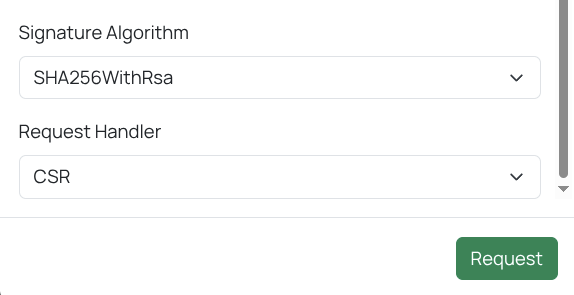
Click Request.
The system creates the CSR and opens the Pending certificate requests page, which lists all pending requests.
Select the newly generated CSR, click Download CSRs, and save the file to your computer.
Send the downloaded CSR to the CA.
Wait for the CA to issue the certificate.
After receiving the certificate from the CA, open the “Pending certificate requests” page and upload the certificate ()
The uploaded certificate will now be associated with the private key and moved to the certificate store.
CEMA request handler
The CEMA Certificate Manager is a modern, fully-featured, certificate lifecyle manager developed by intelliCard Solutions AG (Id-security).
CEMA provides a single, easy-to-use interface for all your PKI tasks by connecting to multiple certification authorities (CAs). It can also connect to the ID-Security (intelliCard) Enrollment Hub, which supports a wide range of enrollment protocols, regardless of the protocols used by your issuing CA.
All certificates are stored securely in a centralized repository, providing easy access for administrators and facilitating efficient management. By implementing granular access controls to manage permissions for certificate management tasks, you ensure that only authorized personnel can perform critical actions on certificates. Define customizable policies for certificate renewal based on expiration dates, usage patterns, and compliance requirements. Automated issuance and renewal ensures uninterrupted service availability suitable for large scale industrial IoT.
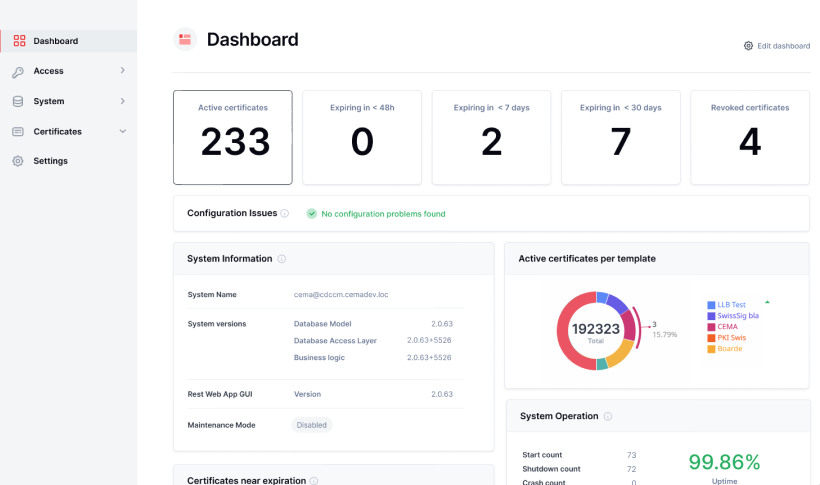
The CEMA request handler connects to a CEMA instance running locally or remotely; that instance then connects to the configured remote CA.
If a full certificate lifecyle process is required it is recommended to use the CEMA connector.
For more information on CEMA see https://www.id-security.com/products/cema-certificate-manager-platform
Tip
To request S/MIME certificates on demand, make sure the CEMA request handler is set as the default request handler. You can configure the default request handler either through the user interface () or by using the CLI:
ciphermail-cli property global set --name ca-default-certificate-request-handler --value cema
GlobalSign Atlas request handler
Attention
Ensure that your GlobalSign account is configured to issue Domain Validated (DV) or Organization Validated (OV) certificates. Do not use Sponsor Validation certificates, as they require user-specific information (such as first name, last name, and company) that is not available by default. If you need to issue a Sponsor Validation certificate, use the CEMA connector.
The GlobalSign Atlas certificate request handler allows your organization to obtain certificates issued by GlobalSign. It connects to GlobalSign’s cloud-based certificate management service and requires a valid GlobalSign Atlas account. If you do not have an account, contact GlobalSign to set one up.
Tip
Before you can issue certificates, make sure the GlobalSign certificate root is installed.
Before certificates can be issued by GlobalSign Atlas, the following steps should be taken:
Create API credetials and configure the gateway for Atlas
Request an mTLS certificate
Register your domain(s)
Approve your domain(s)
Optionally, configure the request template
You will need the ciphermail-cli command-line tool for some steps.
Generate API Credential
Log into your GlobalSign Atlas Account
On the GlobalSign Atlas management page, open the API Credentials page ()
Click Generate an API Credential button
Select View and Copy and click continue
Select the active service you want to link to the new API credential and click Continue
Select a familiar name for the new credential and click continue. A new API key and API Secret will be generated.
Warning
The API Secret will only be shown once. You should therefore copy the API Secret before closing the page.
Configure the API key and secret
ciphermail-cli property global set --name gs-atlas-api-key --value <api-key-value>
ciphermail-cli property global set --name gs-atlas-api-secret --value <api-secret-value>
Create mTLS certificate
GlobalSign Atlas uses mutual TLS (mTLS) for authentication. To connect, you must configure a client certificate for mTLS.
The mTLS certificate should be configured with the ciphermail-cli command-line tool:
From the command line, generate an mTLS certificate request and copy the CSR:
ciphermail-cli globalsign atlas create mtls-certificate-requestLog into your GlobalSign Atlas Account. On the GlobalSign management page, open the mTLS certificates page (), then click Generate an MTLS Certificate
On the GlobalSign “How do you plan to connect to the service?” page, select Directly via the API and click Continue
On the GlobalSign “Link API Credential(s)” page, select the API credentials created in the previous steps and click Continue
On the GlobalSign “Paste a CSR” page, copy and paste the CSR which was generated in the first step and click Continue
Copy the generated mTLS certificate by clicking Copy to Clipboard and paste the mTLS certificate to a file.
Copy the certificate file to the CipherMail system and import the mTLS certificate
ciphermail-cli globalsign atlas import mtls-certificate --certificate-file /path/to/certificate
Register your domain(s)
Before requesting S/MIME certificates, your domain must be approved by GlobalSign. To obtain domain approval, complete the following steps:
You must add the domain to Atlas before you can validate it:
Open the domains page from the GlobalSign Dashboard
Click New Domain, select the identity and specify the new domain name to be added and click Save and continue.
Select Verify this domain
Select the preferred validation method. For example for DNS validation, copy the “Domain Verification Code (DVC)” and add a DNS TXT record:
example DNS entry:
ciphermail.com. 300 IN TXT "globalsign-domain-verification=5E6DA5B0F899E345915CA238473338B7"
Tip
If you did not save the DNS token, open the GlobalSign Atlas search domain
claims wizard to view it again. The token will be shown without the
globalsign-domain-verification= prefix.
Configure request template
When you request a certificate, the data sent to GlobalSign is generated from a JSON-formatted request template.
The configured request template can be retrieved with the following cli command:
ciphermail-cli property global get --name gs-atlas-request-template
Tip
The request template value can be extracted from the property value with the help of jq:
ciphermail-cli property global get --name gs-atlas-request-template | jq -r .value | jq
The default request template looks as follows:
{
  "validity": {
    "not_before": "${not_before}",
    "not_after": "${not_after}"
  },
  "subject_dn": {
    "common_name": "${cn}",
    "country": "${c}",
    "state": "${st}",
    "locality": "${l}",
    "street_address": "${street}",
    "organization": "${o}",
    "organizational_unit": [
      "${ou}"
    ],
    "email": "${email}"
  },
  "san": {
    "emails": [
      "${email}"
    ]
  },
  "signature": {
    "hash_algorithm": "SHA-256"
  },
  "public_key": "${public_key}"
}
Fields enclosed in ${} are automatically replaced with their actual values when
you submit a certificate request. If a value is not available, the entire line
is removed from the final JSON request.
Which fields are required for the certificate request, depends on the validation policy set by GlobalSign for the account. The validation policy for the account can be listed using the following cli command:
ciphermail-cli globalsign atlas get validation-policy
If a certificate request fails, check the MPA log. The error message returned by GlobalSign will identify which field is missing from the request. Add the missing field to your request template and try again.
Create a request template JSON file
Configure the new request template
ciphermail-cli property global set file --name gs-atlas-request-template --file <request-template-json-file>
Tip
To request S/MIME certificates on demand, make sure the GlobalSign request handler is set as the default request handler. You can configure the default request handler either through the user interface () or by using the CLI:
ciphermail-cli property global set --name ca-default-certificate-request-handler --value "GlobalSign Atlas"
SwissSign request handler
Attention
Ensure that your SwissSign account is configured to issue Domain Validated (DV) or Organization Validated (OV) certificates. Do not use Sponsor Validation certificates, as they require user-specific information (such as first name, last name, and company) that is not available by default. If you need to issue a Sponsor Validation certificate, use the CEMA connector.
Before you can use the SwissSign request handler, you must have a configured SwissSign account. For information on creating and configuring your account, contact SwissSign.
Tip
Before you can issue certificates, make sure the SwissSign certificate root is installed.
To configure SwissSign follow these steps:
Login to the admin GUI
Open the SwissSign settings page
Enter the username and User secret (API secret) for your SwissSign account
Open the command line and execute the following cli command:
ciphermail-cli swisssign mpki get clientsThis will return a list of the products you can use from SwissSign. Copy the uuid of the product you want to use (the code should starts with the
pma-prefix).Open the SwissSign settings page and paste the uuid value to the “Certificate product reference UUID” field
You should now be able to request a cert using the SwissSign MPKI handler
Tip
To request S/MIME certificates on demand, make sure the GlobalSign request handler is set as the default request handler. You can configure the default request handler either through the user interface () or by using the CLI:
ciphermail-cli property global set --name ca-default-certificate-request-handler --value "SwissSign MPKI"
Scriptable request handler
Added in version 6.3.5.
The scriptable request handler delegates the actual certificate request to an
external script (for example a Bash or Python script). The gateway sends the
certificate request to the script as JSON on stdin and the script returns the
result (an issued certificate chain, or a “still pending” response) as JSON on
stdout. This makes it possible to integrate with virtually any external CA —
including a CA that exposes a proprietary REST API — without writing any Java
code.
The script is a normal executable that:
reads a single JSON object from standard input;
performs (part of) the certificate request, typically by calling a remote CA;
writes a single JSON object to standard output.
Because a remote CA may not issue a certificate immediately, the handler is asynchronous: if the script does not return a certificate, the request stays pending and the script is called again later by the certificate request background thread. The script can carry state between these invocations, which is described in Persisting data across multiple invocations.
Note
The script runs with the privileges of the gateway backend. All request data
is passed on stdin only, never as command line arguments. Nevertheless you
should treat every value in the request JSON as untrusted input when you build
command lines, configuration files or CA API calls inside the script.
Tip
Fully documented example scripts (Bash and Python) that sign the request with a local intermediate CA are included at the end of this section (see Example scripts). Use them as a starting point for a production script.
Configuring the scriptable request handler requires two steps:
Create a Spring configuration file that registers the handler and points it at your script.
Create the script that talks to your CA.
Create the Spring configuration
The scriptable request handler is not enabled by default. To enable it, add a
Spring XML file to the spring.d directory (by default
/etc/ciphermail/spring.d). Every *.xml file in that directory is loaded
on startup.
Create a file, for example
/etc/ciphermail/spring.d/scriptable-certificate-request-handler.xml, with the
following content:
<?xml version="1.0" encoding="UTF-8"?>
<beans xmlns="http://www.springframework.org/schema/beans"
    xmlns:xsi="http://www.w3.org/2001/XMLSchema-instance"
    xsi:schemaLocation="
        http://www.springframework.org/schema/beans http://www.springframework.org/schema/beans/spring-beans.xsd">

    <bean id="scriptableCertificateRequestHandler"
          class="com.ciphermail.enterprise.app.ca.handlers.scriptable.ScriptableCertificateRequestHandler">

        <!-- The (unique) name of the certificate request handler -->
        <constructor-arg value="Scriptable"/>

        <!-- The command to run: the script followed by optional fixed arguments -->
        <constructor-arg>
            <list>
                <value>/opt/ciphermail/scripts/request-certificate.sh</value>
            </list>
        </constructor-arg>

        <constructor-arg ref="keyStoreProvider"/>
        <constructor-arg ref="keyStorePasswordProvider"/>
        <constructor-arg ref="serialNumberGenerator"/>
        <constructor-arg ref="pkiSecurityServices"/>

        <!-- Maximum number of milliseconds the script may run before it is terminated (default 30 seconds) -->
        <property name="timeout" value="30000"/>
    </bean>

    <bean class="org.springframework.beans.factory.config.MethodInvokingBean">
        <property name="targetObject" ref="certificateRequestHandlerRegistry"/>
        <property name="targetMethod"><value>registerHandler</value></property>
        <property name="arguments">
            <list>
                <ref bean="scriptableCertificateRequestHandler" />
            </list>
        </property>
    </bean>
</beans>
The most important settings are:
- Handler name (first
constructor-arg) The unique name of the request handler as shown in the admin interface and used to select it. In the example above the name is
Scriptable.- Command (second
constructor-arg) A list containing the script to execute followed by any fixed arguments. Use an absolute path, or a path relative to the gateway working directory. The request JSON is written to the script’s standard input; no request data is ever passed as a command line argument.
timeoutThe maximum number of milliseconds the script may run before it is terminated. The default is 30000 (30 seconds).
You can register several scriptable handlers side by side (for example one per
CA) by adding more beans, each with a unique id, a unique handler name and its
own script.
Restart the gateway backend after adding or changing the configuration.
Tip
To request S/MIME certificates on demand, make sure the scriptable request handler is set as the default request handler. You can configure the default request handler either through the user interface () or by using the CLI (use the handler name configured above):
ciphermail-cli property global set --name ca-default-certificate-request-handler --value Scriptable
Create the script
The script reads the request JSON from stdin and writes the result JSON to
stdout.
Important
Standard output must contain only the result JSON. Write any logging or diagnostic output to standard error; the gateway captures standard error and writes it to the log.
Request JSON: input sent to the script
The gateway writes a single JSON object to the script’s standard input. An example:
{
  "id": "0c8f9b2e-6d1a-4f3b-9a7c-2e5d8f1a4b6c",
  "created": 1737892800000,
  "email": "john.doe@example.com",
  "validity": 365,
  "signatureAlgorithm": "SHA256WithRSA",
  "keyLength": 2048,
  "keyAlgorithm": "RSA_2048",
  "crlDistributionPoint": "http://example.com/crl/example.crl",
  "info": null,
  "data": null,
  "subject": {
    "cn": "John Doe",
    "o": "Example Inc",
    "emailaddress": "john.doe@example.com"
  },
  "certificationRequest": "-----BEGIN CERTIFICATE REQUEST-----\n...\n-----END CERTIFICATE REQUEST-----\n",
  "publicKey": "-----BEGIN PUBLIC KEY-----\n...\n-----END PUBLIC KEY-----\n"
}
The fields are:
emailThe email address the certificate is requested for. It is used as the
rfc822Namesubject alternative name of the S/MIME certificate. This field must be honored by the script; it identifies the subject.publicKeyThe PEM encoded public key that the gateway generated for this request. The issued certificate must certify this public key. The same public key is also contained in
certificationRequest.certificationRequestA PEM encoded PKCS#10 certificate signing request (CSR) generated by the gateway. It contains the
publicKeyand thesubjectand is convenient to pass directly to a CA that accepts a CSR.subjectA JSON object with the components of the subject distinguished name (DN). Each key is the lower-case short name of the attribute (for example
cn,o,ou,c,emailaddress); an attribute without a known short name uses its dotted OID as the key.validityThe requested validity in days.
signatureAlgorithmThe requested signature algorithm (for example
SHA256WithRSA).keyLengthThe length in bits of the generated key (for an EC key the size of the curve).
keyAlgorithmThe algorithm of the generated key:
RSA_2048,RSA_3072,RSA_4096,SECP256R1,SECP384R1,SECP521R1,BRAINPOOLP256R1,BRAINPOOLP384R1orBRAINPOOLP512R1.crlDistributionPointThe requested CRL distribution point URL, or
nullwhen none is configured.infoFree-form informational text of the request, or
null.idThe unique id of the request, or
nullwhen the request has not been persisted yet.createdThe creation time of the request as epoch milliseconds.
dataThe JSON value the script returned in the
datafield on the previous invocation, ornullon the first invocation. See Persisting data across multiple invocations.
Important
A script only has to use the fields it needs. All request fields except
email and publicKey may be ignored.
Several fields — validity, signatureAlgorithm, keyLength,
keyAlgorithm, crlDistributionPoint and (parts of) subject — are populated from the CA
settings (CAProperties) or from the values the administrator entered when the
certificate was requested manually. The script may honor them or ignore them,
depending on what the CA supports; a remote CA commonly enforces its own
validity period, signature algorithm, key length and CRL distribution point
regardless of what the gateway requested. email and publicKey must
always be honored, because they define the identity and the key of the issued
certificate.
Result JSON: output returned by the script
The script writes a single JSON object to standard output. An example of a successful issuance:
{
  "chain": [
    "-----BEGIN CERTIFICATE-----\n...leaf (end-user)...\n-----END CERTIFICATE-----\n",
    "-----BEGIN CERTIFICATE-----\n...intermediate...\n-----END CERTIFICATE-----\n",
    "-----BEGIN CERTIFICATE-----\n...root...\n-----END CERTIFICATE-----\n"
  ],
  "message": "Certificate issued",
  "info": "Signed by the intermediate CA",
  "data": null
}
The fields are:
chainThe issued certificate chain as an array of PEM encoded certificates, with the end-user (leaf) certificate first, followed by the intermediate certificate(s) and optionally the root. When a chain is returned the request is finished and the certificate and its private key are stored. Return
null(or omit the field) when no certificate has been issued yet; the request then stays pending and the script is called again later.cancelOptional boolean. Set to
trueto cancel the request: the cancellation is logged and the request is removed from the list of pending requests (it is no longer retried). Use this when the request should be permanently abandoned, for example when the CA has rejected it and retrying would be pointless. This differs from a non-zero exit code, which keeps the request pending.messageOptional free-form message. It is stored as the request’s last message and is shown in the list of pending requests, which is convenient for reporting progress or the reason a request is still pending.
infoOptional free-form information. It is stored as the request’s info.
dataOptional JSON value that is stored with the request and passed back to the script (as the
datainput field) on the next invocation. See Persisting data across multiple invocations.
Persisting data across multiple invocations
Many CAs do not issue a certificate immediately. A typical REST-based CA works in
two steps: first you submit the request and receive an order id, then you poll the
CA with that order id until the certificate is ready. The scriptable request
handler supports such multi-step processing with the data field.
The mechanism is:
Whenever the script returns a result without a certificate chain, the value of the
dataoutput field is stored in the persistent request.The next time the certificate request background thread processes the request, the script is called again with the stored value in the
datainput field (it isnullon the very first invocation).This repeats until the script returns a certificate chain (the request is then finished) or the request is removed.
The data value is arbitrary JSON, so the script can persist whatever state it
needs — an order id, a step counter, a timestamp, and so on. The gateway does not
interpret it; it only stores it and hands it back on the next invocation.
The following (simplified) Python example uses data to remember an order id
returned by a remote CA:
#!/usr/bin/env python3
import json
import sys

request = json.load(sys.stdin)
data = request.get("data") or {}

if "order_id" not in data:
    # First invocation: submit the CSR to the CA and remember the order id.
    order_id = submit_to_ca(request["certificationRequest"], request["email"])
    result = {
        "chain": None,                      # no certificate yet -> request stays pending
        "message": "Submitted to CA; awaiting issuance",
        "data": {"order_id": order_id},     # persisted and returned on the next call
    }
else:
    # Later invocation: poll the CA using the stored order id.
    chain = poll_ca(data["order_id"])       # returns a list of PEM certificates, or None
    if chain:
        result = {"chain": chain, "message": "Certificate issued"}
    else:
        result = {
            "chain": None,
            "message": "Still pending at the CA",
            "data": data,                   # keep the order id for the next call
        }

json.dump(result, sys.stdout)
Note
A pending request is retried by the certificate request background thread. The
interval between retries is determined by the pending request schedule, not by
the script. Do not wait or poll in a loop inside the script — return a
“pending” result (chain is null) and let the gateway call the script
again later.
Reporting errors
There are two distinct outcomes when a certificate is not returned:
- Pending
Returning a result whose
chainisnullmeans “not issued yet, try again later”. This is the normal way to model a multi-step request and is not an error. Setmessageto explain why the request is still pending.- Error
If the script cannot complete the request (for example the CA is unreachable or rejects the request), it should exit with a non-zero exit code. The gateway keeps the request pending and stores the failure as the request’s last message, so it is visible in the list of pending requests. Any detail the script writes to standard error is captured in the gateway log.
Example scripts
The following fully documented example scripts sign the request with a local
intermediate CA. They demonstrate the complete stdin/stdout contract, multi-step
processing with the data field, and error handling, and are a good starting
point for a production script. Click a title to expand the script.
Note
The example scripts default to signing with the bundled test CA
(testCA.p12, password test). They are intended as a template, not for
production use as-is: a production script should talk to your real CA and must
validate the request against your own policy.
Bash example script (scriptable-certificate-request-handler.sh)
#!/usr/bin/env bash
#
# Example certificate request script for the ScriptableCertificateRequestHandler (Bash + OpenSSL).
#
# The ScriptableCertificateRequestHandler delegates the actual certificate request to an external script. This is an
# EXAMPLE / TEST implementation intended to be used as a starting point for a real production script that talks to an
# external CA. It signs the incoming certificate signing request (CSR) with a local intermediate CA and demonstrates:
#
#   * the stdin/stdout JSON contract of the handler;
#   * a MULTI-STEP request: the certificate is not issued on the first invocation but only after an intermediate step,
#     with the step counter persisted in the "data" field (proving that a script can keep state between invocations);
#   * error handling: any failure returns a non-zero exit code, which the handler turns into the request's last message.
#
# ---------------------------------------------------------------------------------------------------------------------
# Protocol
# ---------------------------------------------------------------------------------------------------------------------
#
# The handler writes a single JSON object to the script's STANDARD INPUT:
#
#   {
#     "id"                   : the request id (or null when not yet persisted),
#     "created"              : creation time as epoch milliseconds,
#     "email"                : the recipient email address,
#     "validity"             : the requested validity in days,
#     "signatureAlgorithm"   : the requested signature algorithm (e.g. "SHA256WithRSA"),
#     "keyLength"            : the requested key length,
#     "crlDistributionPoint" : the requested CRL distribution point (or null),
#     "info"                 : free form info of the request,
#     "data"                 : the JSON blob THIS script returned on the previous invocation (or null the first time),
#     "subject"              : an object with the subject DN components (cn, o, ou, ...),
#     "certificationRequest" : the PEM encoded PKCS#10 CSR (contains the public key and subject),
#     "publicKey"            : the PEM encoded public key
#   }
#
# The script must write a single JSON object to its STANDARD OUTPUT:
#
#   {
#     "chain"   : the issued certificate chain as an array of PEM certificates, END-ENTITY (leaf) FIRST, followed by
#                 the intermediate(s) and root; or null when no certificate was issued (yet),
#     "cancel"  : true to cancel the request; the request is then logged as canceled and removed (no longer retried),
#     "message" : a free form message; stored as the request's last message,
#     "info"    : free form info; stored as the request's info,
#     "data"    : a free form JSON blob; persisted by the handler and handed back to the script (as the stdin "data"
#                 element) on the next invocation
#   }
#
# IMPORTANT:
#   * STDOUT must contain ONLY the JSON result. Write all logging / diagnostics to STDERR (the handler logs stderr).
#   * To report an error, exit with a NON-ZERO exit code. The handler keeps the request pending and records the
#     failure as the request's last message. Human readable detail should be written to stderr.
#
# ---------------------------------------------------------------------------------------------------------------------
# Configuration (environment variables)
# ---------------------------------------------------------------------------------------------------------------------
#
#   CA_P12          PKCS#12 file containing the signing (intermediate) CA key and certificate.
#                   Defaults to the bundled test CA (community/.../testdata/keys/testCA.p12).
#   CA_PASSWORD     Password of the PKCS#12 file (default "test").
#   CA_ALIAS        friendlyName (alias) of the signing key/certificate inside the PKCS#12 (default "ca").
#   ROOT_ALIAS      friendlyName (alias) of the root certificate inside the PKCS#12 (default "root").
#   REQUIRED_STEPS  Number of intermediate (pending) steps before the certificate is issued (default 1).
#
# ---------------------------------------------------------------------------------------------------------------------
# Wiring (spring.d)
# ---------------------------------------------------------------------------------------------------------------------
#
# Reference this script from the ScriptableCertificateRequestHandler bean, for example:
#
#   <constructor-arg>
#       <list>
#           <value>/etc/ciphermail/scripts/scriptable-certificate-request-handler.sh</value>
#       </list>
#   </constructor-arg>
#
# Requires: bash, openssl and jq on the PATH.

# Fail fast: exit on error, on unset variable and on any failure in a pipeline.
set -euo pipefail

# ---------------------------------------------------------------------------------------------------------------------
# Logging helper. All diagnostics go to stderr so stdout stays pure JSON.
# ---------------------------------------------------------------------------------------------------------------------
log() {
    echo "[scriptable-certificate-request-handler] $*" >&2
}

# Report an unexpected failure (via the ERR trap) and exit non-zero so the handler marks the request as failed.
on_error() {
    local exit_code=$?
    log "ERROR: script failed (exit code ${exit_code})"
    exit "${exit_code}"
}
trap on_error ERR

# ---------------------------------------------------------------------------------------------------------------------
# Resolve configuration and default the signing CA to the bundled test keystore (relative to this script).
# ---------------------------------------------------------------------------------------------------------------------
SCRIPT_DIR="$(cd "$(dirname "${BASH_SOURCE[0]}")" && pwd)"
DEFAULT_CA_P12="${SCRIPT_DIR}/../../community/ciphermail-core/src/test/resources/testdata/keys/testCA.p12"

CA_P12="${CA_P12:-${DEFAULT_CA_P12}}"
CA_PASSWORD="${CA_PASSWORD:-test}"
CA_ALIAS="${CA_ALIAS:-ca}"
ROOT_ALIAS="${ROOT_ALIAS:-root}"
REQUIRED_STEPS="${REQUIRED_STEPS:-1}"

# Create a private, self-cleaning working directory for the temporary PEM files.
WORK_DIR="$(mktemp -d)"
trap 'rm -rf "${WORK_DIR}"' EXIT

# ---------------------------------------------------------------------------------------------------------------------
# Read and parse the request from stdin.
# ---------------------------------------------------------------------------------------------------------------------
REQUEST_JSON="$(cat)"

# jq_get FIELD [DEFAULT] -- extract a (string) field from the request, using DEFAULT when it is null/absent.
jq_get() {
    local filter="$1" default="${2:-}"
    printf '%s' "${REQUEST_JSON}" | jq -r --arg d "${default}" "(${filter}) // \$d"
}

EMAIL="$(jq_get '.email')"
VALIDITY="$(jq_get '.validity' '365')"
SIGNATURE_ALGORITHM="$(jq_get '.signatureAlgorithm' 'SHA256WithRSA')"
CSR_PEM="$(jq_get '.certificationRequest')"

# The step counter is persisted in the "data" field. It is null/absent on the first invocation.
CURRENT_STEP="$(jq_get '.data.step' '0')"
NEXT_STEP=$((CURRENT_STEP + 1))

log "Handling certificate request for '${EMAIL}' (step ${NEXT_STEP}, created id=$(jq_get '.id'))"

# ---------------------------------------------------------------------------------------------------------------------
# Multi-step handling: stay pending until REQUIRED_STEPS intermediate steps have passed.
#
# A real production script would instead, on the first call, submit the CSR to the external CA and store the returned
# order/reference id in "data"; on subsequent calls it would poll the CA using that id until the certificate is ready.
# ---------------------------------------------------------------------------------------------------------------------
if [[ "${NEXT_STEP}" -le "${REQUIRED_STEPS}" ]]; then
    log "Certificate not issued yet; request is pending (step ${NEXT_STEP}/${REQUIRED_STEPS})."

    # chain is null -> the handler keeps the request pending and calls us again later with this "data".
    jq -n --argjson step "${NEXT_STEP}" '
        {
            chain:   null,
            message: "Waiting for the CA (step \($step))",
            info:    "Certificate request submitted; awaiting issuance.",
            data:    { step: $step }
        }'
    exit 0
fi

# ---------------------------------------------------------------------------------------------------------------------
# Issue the certificate: sign the CSR with the intermediate CA taken from the PKCS#12 keystore.
# ---------------------------------------------------------------------------------------------------------------------
log "Issuing certificate by signing the CSR with CA alias '${CA_ALIAS}' from '${CA_P12}'."

if [[ ! -r "${CA_P12}" ]]; then
    log "ERROR: CA PKCS#12 file '${CA_P12}' does not exist or is not readable."
    exit 1
fi

# pkcs12_dump TYPE -- dump the PKCS#12 bags of the given type (keys or certs) as interleaved bag attributes + PEM.
#
# Note: the bundled test keystore uses legacy (RC2/3DES) encryption, hence "-legacy". A modern production keystore
# usually does not need this flag; remove it if OpenSSL rejects "-legacy".
pkcs12_dump() {
    local type_flag="$1"
    openssl pkcs12 -in "${CA_P12}" -passin "pass:${CA_PASSWORD}" -legacy "${type_flag}" -noenc 2>/dev/null
}

# extract_bag ALIAS -- read an OpenSSL PKCS#12 dump from stdin and print only the PEM block(s) whose bag friendlyName
# equals ALIAS. This lets us pick a specific key/certificate when the keystore holds more than one (here: ca + root).
extract_bag() {
    awk -v want="$1" '
        /^Bag Attributes/           { fn = "" }
        /friendlyName:/             { fn = $0; sub(/.*friendlyName: */, "", fn) }
        /-----BEGIN/                { in_pem = 1 }
        in_pem && fn == want        { print }
        /-----END/                  { in_pem = 0 }
    '
}

# Extract the signing key + certificate (alias "ca") and the root certificate (alias "root").
KEY_DUMP="$(pkcs12_dump -nocerts)"
CERT_DUMP="$(pkcs12_dump -nokeys)"

printf '%s\n' "${KEY_DUMP}"  | extract_bag "${CA_ALIAS}"   > "${WORK_DIR}/ca-key.pem"
printf '%s\n' "${CERT_DUMP}" | extract_bag "${CA_ALIAS}"   > "${WORK_DIR}/ca-cert.pem"
printf '%s\n' "${CERT_DUMP}" | extract_bag "${ROOT_ALIAS}" > "${WORK_DIR}/root-cert.pem"

if [[ ! -s "${WORK_DIR}/ca-key.pem" || ! -s "${WORK_DIR}/ca-cert.pem" ]]; then
    log "ERROR: could not extract the signing key/certificate for alias '${CA_ALIAS}' from the keystore."
    exit 1
fi

# Write the CSR to a file for openssl.
printf '%s\n' "${CSR_PEM}" > "${WORK_DIR}/request.csr"

# Map the requested signature algorithm (e.g. "SHA256WithRSA") to an OpenSSL message digest.
case "$(printf '%s' "${SIGNATURE_ALGORITHM}" | tr '[:upper:]' '[:lower:]')" in
    *sha512*) DIGEST="sha512" ;;
    *sha384*) DIGEST="sha384" ;;
    *sha256*) DIGEST="sha256" ;;
    *sha1*)   DIGEST="sha1"   ;;
    *)        DIGEST="sha256" ;;
esac

# X.509 v3 extensions for an S/MIME end-entity certificate. The subject alternative name (email) is what mail clients
# match on, so it is essential for S/MIME. The subject DN itself is taken from the CSR by "openssl x509 -req".
cat > "${WORK_DIR}/extensions.cnf" <<EXT
basicConstraints       = CA:FALSE
keyUsage               = critical, digitalSignature, keyEncipherment
extendedKeyUsage       = emailProtection
subjectKeyIdentifier   = hash
authorityKeyIdentifier = keyid, issuer
subjectAltName         = email:${EMAIL}
EXT

# Sign the CSR. "-CAcreateserial" manages the serial number file; a real CA controls serial numbers itself.
openssl x509 -req \
    -in       "${WORK_DIR}/request.csr" \
    -CA       "${WORK_DIR}/ca-cert.pem" \
    -CAkey    "${WORK_DIR}/ca-key.pem" \
    -CAserial "${WORK_DIR}/ca.srl" -CAcreateserial \
    -days     "${VALIDITY}" \
    -"${DIGEST}" \
    -extfile  "${WORK_DIR}/extensions.cnf" \
    -out      "${WORK_DIR}/leaf-cert.pem" 2>>"${WORK_DIR}/openssl.err" || {
        log "ERROR: openssl failed to sign the CSR:"
        cat "${WORK_DIR}/openssl.err" >&2
        exit 1
    }

log "Certificate issued for '${EMAIL}'."

# ---------------------------------------------------------------------------------------------------------------------
# Emit the result: the full chain (leaf first), plus the final step in "data".
# ---------------------------------------------------------------------------------------------------------------------
jq -n \
    --rawfile leaf "${WORK_DIR}/leaf-cert.pem" \
    --rawfile ca   "${WORK_DIR}/ca-cert.pem" \
    --rawfile root "${WORK_DIR}/root-cert.pem" \
    --argjson step "${NEXT_STEP}" \
    '
    {
        chain:   [ $leaf, $ca, $root ],
        message: "Certificate issued",
        info:    "Signed by the intermediate CA.",
        data:    { step: $step }
    }'
Python example script (scriptable-certificate-request-handler.py)
#!/usr/bin/env python3
#
# Example certificate request script for the ScriptableCertificateRequestHandler (Python 3 + cryptography).
#
# The ScriptableCertificateRequestHandler delegates the actual certificate request to an external script. This is an
# EXAMPLE / TEST implementation intended to be used as a starting point for a real production script that talks to an
# external CA. It signs the incoming certificate signing request (CSR) with a local intermediate CA and demonstrates:
#
#   * the stdin/stdout JSON contract of the handler;
#   * a MULTI-STEP request: the certificate is not issued on the first invocation but only after an intermediate step,
#     with the step counter persisted in the "data" field (proving that a script can keep state between invocations);
#   * error handling: any failure returns a non-zero exit code, which the handler turns into the request's last message.
#
# ---------------------------------------------------------------------------------------------------------------------
# Protocol
# ---------------------------------------------------------------------------------------------------------------------
#
# The handler writes a single JSON object to the script's STANDARD INPUT:
#
#   {
#     "id"                   : the request id (or null when not yet persisted),
#     "created"              : creation time as epoch milliseconds,
#     "email"                : the recipient email address,
#     "validity"             : the requested validity in days,
#     "signatureAlgorithm"   : the requested signature algorithm (e.g. "SHA256WithRSA"),
#     "keyLength"            : the requested key length,
#     "crlDistributionPoint" : the requested CRL distribution point (or null),
#     "info"                 : free form info of the request,
#     "data"                 : the JSON blob THIS script returned on the previous invocation (or null the first time),
#     "subject"              : an object with the subject DN components (cn, o, ou, ...),
#     "certificationRequest" : the PEM encoded PKCS#10 CSR (contains the public key and subject),
#     "publicKey"            : the PEM encoded public key
#   }
#
# The script must write a single JSON object to its STANDARD OUTPUT:
#
#   {
#     "chain"   : the issued certificate chain as an array of PEM certificates, END-ENTITY (leaf) FIRST, followed by
#                 the intermediate(s) and root; or null when no certificate was issued (yet),
#     "cancel"  : true to cancel the request; the request is then logged as canceled and removed (no longer retried),
#     "message" : a free form message; stored as the request's last message,
#     "info"    : free form info; stored as the request's info,
#     "data"    : a free form JSON blob; persisted by the handler and handed back to the script (as the stdin "data"
#                 element) on the next invocation
#   }
#
# IMPORTANT:
#   * STDOUT must contain ONLY the JSON result. Write all logging / diagnostics to STDERR (the handler logs stderr).
#   * To report an error, exit with a NON-ZERO exit code. The handler keeps the request pending and records the
#     failure as the request's last message. Human readable detail should be written to stderr.
#
# ---------------------------------------------------------------------------------------------------------------------
# Configuration (environment variables)
# ---------------------------------------------------------------------------------------------------------------------
#
#   CA_P12          PKCS#12 file containing the signing (intermediate) CA key and certificate.
#                   Defaults to the bundled test CA (community/.../testdata/keys/testCA.p12).
#   CA_PASSWORD     Password of the PKCS#12 file (default "test").
#   REQUIRED_STEPS  Number of intermediate (pending) steps before the certificate is issued (default 1).
#
# ---------------------------------------------------------------------------------------------------------------------
# Wiring (spring.d)
# ---------------------------------------------------------------------------------------------------------------------
#
# Reference this script from the ScriptableCertificateRequestHandler bean, for example:
#
#   <constructor-arg>
#       <list>
#           <value>/usr/bin/python3</value>
#           <value>/etc/ciphermail/scripts/scriptable-certificate-request-handler.py</value>
#       </list>
#   </constructor-arg>
#
# Requires: Python 3 and the "cryptography" package (pip install cryptography).

import datetime
import json
import os
import sys
import warnings

from cryptography import x509
from cryptography.hazmat.primitives import hashes
from cryptography.hazmat.primitives.serialization import Encoding, pkcs12
from cryptography.x509.oid import ExtendedKeyUsageOID, NameOID


def log(message):
    """Write a diagnostic line to stderr. Stdout is reserved for the JSON result."""
    print(f"[scriptable-certificate-request-handler] {message}", file=sys.stderr)


# Map the requested signature algorithm (e.g. "SHA256WithRSA") to a cryptography hash instance.
def hash_for(signature_algorithm):
    name = (signature_algorithm or "").lower()
    if "sha512" in name:
        return hashes.SHA512()
    if "sha384" in name:
        return hashes.SHA384()
    if "sha1" in name:
        return hashes.SHA1()
    return hashes.SHA256()


def issue_certificate(request, next_step):
    """Sign the CSR from the request with the intermediate CA and return the result dict (with a non-null chain)."""
    ca_p12_path = os.environ.get(
        "CA_P12",
        # Default to the bundled test CA, relative to this script.
        os.path.join(
            os.path.dirname(os.path.abspath(__file__)),
            "..", "..", "community", "ciphermail-core", "src", "test",
            "resources", "testdata", "keys", "testCA.p12",
        ),
    )
    ca_password = os.environ.get("CA_PASSWORD", "test").encode()

    log(f"Issuing certificate by signing the CSR with the CA from '{ca_p12_path}'.")

    # Load the intermediate CA key + certificate (and any additional certs, e.g. the root) from the PKCS#12 file.
    with open(ca_p12_path, "rb") as handle:
        p12_bytes = handle.read()

    # The bundled TEST keystore uses a legacy (BER) PKCS#12 encoding, which makes "cryptography" emit a UserWarning.
    # Production keystores are normally DER encoded and will not warn; the suppression below just keeps stderr clean.
    with warnings.catch_warnings():
        warnings.simplefilter("ignore")
        ca_key, ca_cert, additional_certs = pkcs12.load_key_and_certificates(p12_bytes, ca_password)

    if ca_key is None or ca_cert is None:
        raise ValueError(f"PKCS#12 '{ca_p12_path}' does not contain a CA key and certificate")

    # Parse the CSR. It carries the subject DN and the public key the certificate must be issued for. NEVER trust the
    # CSR blindly in production: a real CA validates/overrides the subject, email and key against its own policy.
    csr = x509.load_pem_x509_csr(request["certificationRequest"].encode())

    if not csr.is_signature_valid:
        raise ValueError("CSR signature is not valid")

    email = request.get("email")
    validity_days = int(request.get("validity") or 365)

    now = datetime.datetime.now(datetime.timezone.utc)

    builder = (
        x509.CertificateBuilder()
        .subject_name(csr.subject)
        .issuer_name(ca_cert.subject)
        .public_key(csr.public_key())
        .serial_number(x509.random_serial_number())
        # Backdate slightly to tolerate clock skew between this host and the recipient.
        .not_valid_before(now - datetime.timedelta(hours=1))
        .not_valid_after(now + datetime.timedelta(days=validity_days))
        # An end-entity (leaf) certificate, not a CA.
        .add_extension(x509.BasicConstraints(ca=False, path_length=None), critical=True)
        .add_extension(
            x509.KeyUsage(
                digital_signature=True,
                content_commitment=False,
                key_encipherment=True,
                data_encipherment=False,
                key_agreement=False,
                key_cert_sign=False,
                crl_sign=False,
                encipher_only=False,
                decipher_only=False,
            ),
            critical=True,
        )
        # emailProtection marks the certificate as usable for S/MIME.
        .add_extension(x509.ExtendedKeyUsage([ExtendedKeyUsageOID.EMAIL_PROTECTION]), critical=False)
        .add_extension(x509.SubjectKeyIdentifier.from_public_key(csr.public_key()), critical=False)
        .add_extension(
            x509.AuthorityKeyIdentifier.from_issuer_public_key(ca_cert.public_key()),
            critical=False,
        )
    )

    # The subject alternative name (rfc822/email) is what mail clients match on, so it is essential for S/MIME.
    if email:
        builder = builder.add_extension(
            x509.SubjectAlternativeName([x509.RFC822Name(email)]), critical=False
        )

    leaf = builder.sign(private_key=ca_key, algorithm=hash_for(request.get("signatureAlgorithm")))

    log(f"Certificate issued for '{email}'.")

    # Build the chain leaf-first: end-entity, then the intermediate CA, then any additional certs (e.g. the root).
    chain = [leaf, ca_cert] + list(additional_certs)
    chain_pem = [cert.public_bytes(Encoding.PEM).decode() for cert in chain]

    return {
        "chain": chain_pem,
        "message": "Certificate issued",
        "info": "Signed by the intermediate CA.",
        "data": {"step": next_step},
    }


def main():
    # Read and parse the request from stdin.
    request = json.load(sys.stdin)

    required_steps = int(os.environ.get("REQUIRED_STEPS", "1"))

    # The step counter is persisted in the "data" field. It is null/absent on the first invocation.
    data = request.get("data") or {}
    current_step = int(data.get("step", 0))
    next_step = current_step + 1

    log(f"Handling certificate request for '{request.get('email')}' "
        f"(step {next_step}, id={request.get('id')})")

    # Multi-step handling: stay pending until REQUIRED_STEPS intermediate steps have passed.
    #
    # A real production script would instead, on the first call, submit the CSR to the external CA and store the
    # returned order/reference id in "data"; on subsequent calls it would poll the CA using that id until the
    # certificate is ready.
    if next_step <= required_steps:
        log(f"Certificate not issued yet; request is pending (step {next_step}/{required_steps}).")
        result = {
            "chain": None,
            "message": f"Waiting for the CA (step {next_step})",
            "info": "Certificate request submitted; awaiting issuance.",
            "data": {"step": next_step},
        }
    else:
        result = issue_certificate(request, next_step)

    # STDOUT must contain ONLY the JSON result.
    json.dump(result, sys.stdout)


if __name__ == "__main__":
    try:
        main()
    except Exception as exception:  # noqa: BLE001 - top level guard: report and fail with a non-zero exit code.
        # Report the error on stderr and exit non-zero so the handler keeps the request pending and records the
        # failure as the request's last message.
        log(f"ERROR: {type(exception).__name__}: {exception}")
        sys.exit(1)