S/MIME Certificate Discovery (SCD)
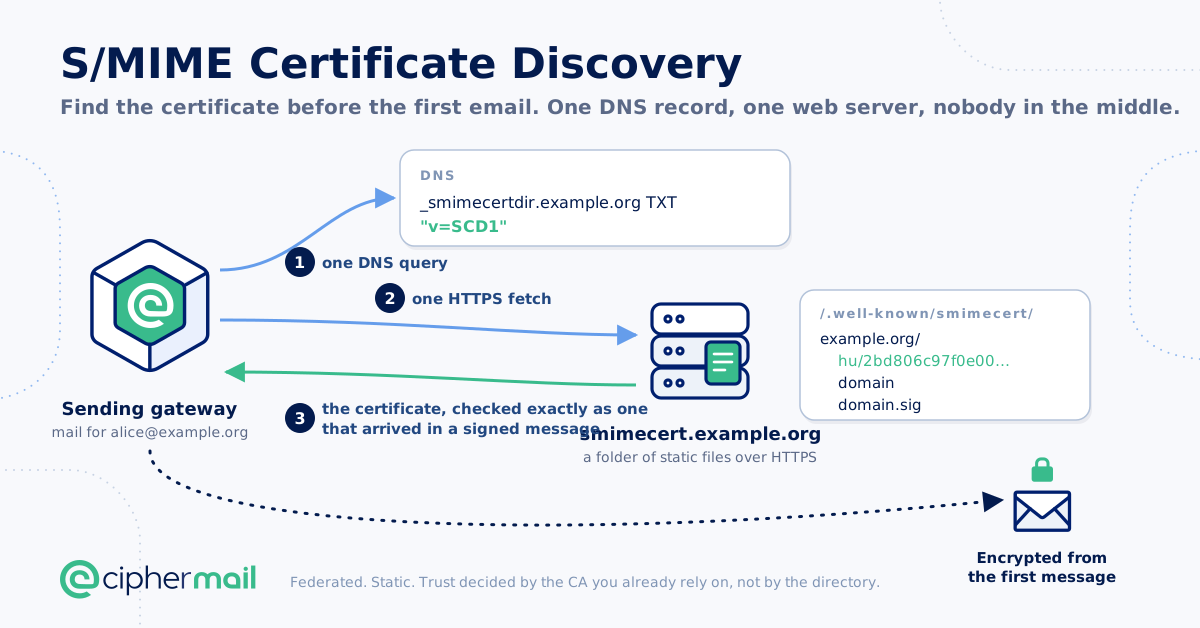
S/MIME Certificate Discovery (SCD) lets the gateway find the S/MIME certificates of external recipients by itself. A domain that takes part announces it with a DNS record and publishes its users’ certificates, and optionally a certificate for the whole domain, in a directory on its web server. When the gateway has no certificate for a recipient, it asks that directory, checks what it finds, and imports the certificates that pass the checks. The next email to the recipient is encrypted without anybody having exchanged certificates by hand.
Tip
Looking for the short route? Looking up the certificates of your correspondents only takes the steps under Enabling. To publish the certificates of your own domain, follow one of the step-by-step guides at the end of this chapter: Step by step: enterprise edition or Step by step: community edition.
Design goals
Federated. Every domain publishes for itself. There is no registry, no central operator, no enrolment, and no bilateral agreement.
Trivial to publish. A conforming directory is a tree of static files on any HTTPS server, including object storage or a static site host, announced by one DNS TXT record. No dynamic code, no database and no new server software are required.
Trivial to consume, and cheap to decline. One DNS query and one HTTPS GET per address — two GETs, once per domain, for a domain certificate — using only primitives already present in every mail gateway and MUA. Crucially, a domain that does not support SCD is identified by the DNS query alone, with no HTTP request at all.
DNSSEC optional. DNSSEC hardens availability, but the protocol MUST be usable and meaningfully secure without it.
Discovery is not trust. The retrieved certificate is a candidate. The relying party decides whether it is acceptable, using the same path validation it applies to a certificate from any other source.
Per-address and per-domain. Both end-user certificates and domain-to-domain (gateway-to-gateway) certificates are supported, the latter with one requirement no CA can supply.
The full S/MIME Certificate Discovery (SCD) specification can be downloaded from https://www.ciphermail.com/downloads/smime-certificate-discovery.pdf
Discovery only makes certificates available. A discovered certificate is checked as any certificate the gateway uses: it must have a valid path to one of the gateway’s trusted roots, must not be revoked, must be usable for encryption, and must name the recipient’s address. A certificate that fails a check is never stored.
The gateway can also publish the certificates of your own users, so that other gateways find them (see Publishing the certificates of your own domains).
Discovery never stops an email. When a lookup fails or finds nothing, the email goes on with the certificates the gateway already holds, and the usual rules apply (for example PDF encryption, or sending without encryption).
Note
Discovery looks up external recipients only. It is off by default.
How it works
A domain that takes part publishes a TXT record:
_smimecertdir.example.org. IN TXT "v=SCD1"
and serves a directory over HTTPS, by default on the host smimecert.<domain>:
https://smimecert.example.org/.well-known/smimecert/example.org/hu/<hash>
https://smimecert.example.org/.well-known/smimecert/example.org/domain
https://smimecert.example.org/.well-known/smimecert/example.org/domain.sig
hu/<hash> holds the certificates of one address; <hash> is derived from
the part of the address before the @. domain holds the domain
certificate, the certificate a gateway of that domain decrypts with on behalf
of all its users, and domain.sig its signature. A domain certificate is only
accepted when it is signed with a key the domain publishes in its TXT record
(the k= field), and when it also passes the checks above.
For a recipient the gateway has no certificate for, a lookup:
asks the DNS for the
_smimecertdirrecord of the recipient’s domain. No record means the domain does not take part, and the gateway remembers that for up to a day;fetches the recipient’s file and, when the domain certificate is allowed (see Mailbox and domain certificates), the domain file and its signature;
checks every certificate it received and imports those that pass.
Answers are cached. A directory answer is reused for at least an hour and at most seven days (a day when the directory gives no lifetime), and after that the gateway asks the directory whether anything changed. A failure, such as a directory that cannot be reached, is remembered for an hour, so that a failing directory is not asked for every email. The scd lookup command asks again at once.
A domain may set the flag flags=domain-only on its record to say that it
publishes a domain certificate only. When the domain certificate is allowed, the
gateway then skips the per-address lookup.
Enabling
Make sure the gateway can reach the directories it will look up: DNS queries for TXT records, and outgoing HTTPS to
smimecert.<domain>of the recipients’ domains. The requests go through the back-end proxy when one is configured (see Proxy ). Behind a proxy, the gateway still refuses a directory whose name resolves to an internal address, where it can resolve the name itself. The proxy resolves the name again, so configure the proxy to refuse connections to internal addresses as well: only the proxy can stop a name that answers the gateway and the proxy differently.Make sure the roots of the CAs that issue your correspondents’ certificates are trusted by the gateway. Discovered certificates are checked against the same roots as every other certificate. A correspondent with a private CA gives you its root; check its fingerprint with them over a trusted channel before you import it.
Turn on Certificate Discovery Enabled. Discovery runs when it is enabled for both the sender and the recipient, so enabling it globally covers all mail. To limit it to a few correspondents, enable it on your own domain (the senders) and on the domains of those correspondents (the recipients), and leave it off globally.
Optionally set Domain Certificate to ALLOWED, globally or for the domains you want to accept a domain certificate from (see Mailbox and domain certificates).
Test with a recipient whose domain publishes certificates:
ciphermail-cli scd lookup --email <recipient>
From the CLI, enabling discovery globally and allowing domain certificates looks like this:
ciphermail-cli property global set --name scd-enabled --value true
ciphermail-cli property global set --name scd-domain-certificate --value ALLOWED
The settings are described under S/MIME Certificate Discovery (SCD).
Mailbox and domain certificates
Mailbox certificates, the certificates of one address, are imported into the certificate store. They are used through Auto Select Encryption Certificates, as any imported certificate is. When auto-select is off for a recipient, a discovered certificate is imported but only used after an administrator selects it for the recipient. In that case the mail flow only looks up a recipient when a domain certificate is allowed and the recipient has no certificate at all; to import a recipient’s own certificate for manual selection, use scd lookup.
A domain certificate is accepted only when Domain Certificate is ALLOWED for the recipient. It is imported and selected on the domain’s S/MIME encryption page, as for manual domain to domain encryption (see Domain to domain encryption). When the gateway has no domain entry for the recipient’s domain yet, discovery creates one. Email to the domain is then encrypted for the domain certificate and, when the gateway holds one, for the recipient’s own certificate as well, so both the receiving gateway and the recipient’s own mail client can decrypt it.
When the recipient’s own lookup fails but the domain certificate is available, the domain certificate is used, and a line is logged (see What is logged).
Discovery never removes anything. A certificate that a directory no longer publishes stays in the store until it expires or an administrator deletes it; a publisher that wants its certificate to stop being used revokes it.
Tip
A domain certificate is a strong assertion: it lets the receiving gateway read all email to the domain. Allow it for the domains you exchange encrypted email with, rather than globally, when you want to keep control over which domains can receive email that way.
Waiting for a lookup
An email waits for the lookups of its recipients at most Maximum Wait (ms) (default 5000, the largest value among the recipients counts). A lookup that takes longer goes on in the background: the email is sent with what the gateway already holds, and the certificate is there for the next email. With 0, an email never waits, and the first email to a new recipient is never encrypted with a discovered certificate.
To protect the gateway, one email starts at most 50 lookups, and at most 1000 lookups wait in all, 50 of them for one domain. Recipients beyond those limits are skipped for that email and logged.
The refresh job
Certificates expire. A publisher puts the successor of a certificate in its directory beside the current one, ahead of the expiry. Once a day, on one node of a cluster, the refresh job looks up the addresses of the certificates that expire within 30 days, so that their successors are imported before they are needed. It looks only at certificates without a private key, for external recipients with discovery enabled, at domains that publish a record.
Each run ends with a summary line in the log, for example:
S/MIME Certificate Discovery refresh: 12 certificate(s) expiring within 30 day(s), 9 address(es) and 2
domain(s) to look at; skipped 3 at a domain without a record, 1 internal or with discovery off, 0 over the
limit of 10000 per run; 7 lookup(s): 2 found, 5 unchanged, 0 failed, 0 still running; 0 state(s) purged; 4120 ms
The job gives way to the mail flow: when the lookups of the mail flow keep the discovery service busy, the run stops, logs a warning, and tries again an hour later.
Administration commands
Two CLI commands help with setting up and diagnosing discovery (see CLI Commands).
scd lookup --email <address>Looks the address up at once, ignoring cached answers and remembered failures, and imports what it finds, as the mail flow would. It waits at most 30 seconds. The answer shows whether the domain publishes a record, the flags of the record, the status of the address and of the domain certificate, the certificates accepted, and every event of the lookup, such as a certificate that was rejected and why. The command needs the permission
scd:lookup-now.scd state --domain <domain>Shows what the gateway remembers of a domain: until when, the record it last read, the certificates discovery accepted for addresses at the domain and for the domain itself, with when and from where, and whether discovery created the domain entry. The command needs the permission
scd:get-domain-state.
The outcome of a lookup is one of:
- FINISHED
The lookup finished; the rest of the answer describes it.
- STILL_RUNNING
The lookup took longer than 30 seconds. It goes on in the background; what it finds is imported, and its events are logged.
- BUSY
The discovery service is busy with the lookups of the mail flow. Try again later.
addressStatus and domainStatus are one of:
- FOUND
Certificates were accepted and imported.
- NONE
Nothing is published for the address, or no domain certificate.
- HELD
A valid certificate is already held; the lookup found nothing new.
- UNCHANGED
The directory’s answer did not change since the last lookup.
- ERROR
The directory could not be read, or what it returned was not usable; the
eventssay why.- NOT_SUPPORTED, NO_DOMAIN, RESOLVER_FAILURE (address only)
The domain publishes no record; the address has no domain; the record could not be queried.
- NOT_ALLOWED (domain only)
Domain Certificate is OFF for the recipient, so the domain certificate was not looked for.
Example:
$ ciphermail-cli scd lookup --email carol@example.org
{
  "outcome": "FINISHED",
  "address": "carol@example.org",
  "domain": "example.org",
  "recordFound": true,
  "recordFlags": [],
  "addressStatus": "NONE",
  "domainStatus": "FOUND",
  "addressCertificates": [],
  "domainCertificates": [
    {
      "subject": "CN=gateway@example.org",
      "issuer": "O=Example, CN=Example Root CA",
      ...
    }
  ],
  "events": []
}
Back-end settings
The following settings tune discovery and publishing. Each is given as its Ansible variable and, in brackets, the back-end property the variable sets. Unset, a setting keeps the default given here.
With Ansible  , set the variables in an Ansible override file, for
example
/etc/ciphermail/ansible/group_vars/all/override.yml, and run the
playbook. A variable is written to the back-end’s configuration only when it is
set.
sudo cm-run-playbook
Without Ansible, set the properties in a YAML file in a subdirectory of
/etc/ciphermail/spring.config.d, for example
/etc/ciphermail/spring.config.d/custom/application.yml, and restart the
back-end. Do not use spring.config.d/backend/application.yml, which the
installation may generate. For example, to publish every hour through a name
server of your own:
ciphermail:
  scd:
    publish-interval: 3600000
    dns-server: 192.0.2.53
sudo systemctl restart ciphermail-backend
- ciphermail_backend__scd_enabled_in_flow
Whether the mail flow contains the discovery step at all. Default
true; with the step in place, discovery still only runs where it is enabled. Not a property: without Ansible the step is always in the flow.- ciphermail_backend__scd_threads (
ciphermail.scd.threads) The threads that run lookups. Default
4.- ciphermail_backend__scd_queue_size (
ciphermail.scd.queue-size) The lookups that may wait besides the running ones. Default
1000.- ciphermail_backend__scd_max_lookups_per_message (
ciphermail.scd.max-lookups-per-message) The most lookups one email starts. Default
50.- ciphermail_backend__scd_max_pending_per_domain (
ciphermail.scd.max-pending-per-domain) The most lookups waiting for one domain. Default
50.- ciphermail_backend__scd_dns_timeout (
ciphermail.scd.dns-timeout) Milliseconds before the TXT query is given up. Default
5000.- ciphermail_backend__scd_connect_timeout (
ciphermail.scd.connect-timeout) Milliseconds before a connection to a directory is given up. Default
5000.- ciphermail_backend__scd_response_timeout (
ciphermail.scd.response-timeout) Milliseconds a directory may take to answer. Default
10000.- ciphermail_backend__scd_refresh_interval (
ciphermail.scd.refresh-interval) Milliseconds between runs of the refresh job;
0turns the job off. Default86400000(a day).- ciphermail_backend__scd_refresh_window_days (
ciphermail.scd.refresh-window-days) Days before expiry the refresh job looks at a certificate. Values below 7 days plus the refresh interval, in whole days, are raised to that: 8 at the default interval of a day. Default
30.- ciphermail_backend__scd_refresh_concurrency (
ciphermail.scd.refresh-concurrency) The most refresh job lookups at a time, at most one per domain. Default
2.- ciphermail_backend__scd_refresh_max_lookups (
ciphermail.scd.refresh-max-lookups) The most lookups in one run of the refresh job. Default
10000.- ciphermail_backend__scd_refresh_startup_delay (
ciphermail.scd.refresh-startup-delay) Milliseconds before the first run after a start, plus a random part of up to the same. Default
300000(five minutes).- ciphermail_backend__scd_publish_interval (
ciphermail.scd.publish-interval) Milliseconds between generations of the published directory on every node. Empty or
0, the default, generates nothing;3600000(an hour) to publish. See Publishing the certificates of your own domains.- ciphermail_backend__scd_dns_server (
ciphermail.scd.dns-server) The name server the discovery TXT queries go to instead of the system’s, as an IP address with an optional port, for example
192.0.2.53or192.0.2.53:5353. Only these queries go there. Default: the system’s name servers.- ciphermail_backend__scd_additional_trust_anchors_path (
ciphermail.scd.additional-trust-anchors-path) A PEM or DER file of CA certificates that the TLS certificates of directories may chain to, besides the roots Java trusts. Use it for a directory with a TLS certificate from a private CA. The file must be readable by the back-end;
/tmpis not, since the back-end has a private one. Default: none.
The additional trust anchors configure the TLS connection to the directory only. Whether a discovered S/MIME certificate is trusted is decided by the gateway’s own roots.
Private links and other locations
By default the directory of a domain is at
https://smimecert.<domain>/.well-known/smimecert, and its host must resolve
to a public address. Two domain settings change that for a correspondent you
have a private arrangement with:
Directory Base URL points the gateway at another location, for example
https://directory.partner.example/.well-known/smimecert.Allow Private Directory Address allows a directory host that resolves to a private address, for a private link between the two organisations.
Without the second setting, a directory that resolves to a private address is refused, so that a record in public DNS cannot make the gateway connect to hosts on your own network.
When the record of a correspondent is only in an internal DNS zone, set the
name server (ciphermail.scd.dns-server); when its directory has a TLS
certificate from a private CA, set the additional trust anchors
(ciphermail.scd.additional-trust-anchors-path). See
Back-end settings.
What is logged
Every lookup that imports something logs it:
Discovered certificate for alice@example.org imported: CN=alice@example.org, from https://...
Discovered domain certificate of example.org assigned: CN=gateway@example.org, from https://...
Domain example.org created for its discovered domain certificate
Lines that start with S/MIME Certificate Discovery: report what a lookup
met. Those marked once are logged once a day per address or domain.
- A discovered certificate was rejected (warning)
A certificate in a directory did not pass the checks; the reason follows, for example no path to a trusted root. If the correspondent uses a private CA, obtain its root from them, check the fingerprint, and import it.
- The signature of a discovered domain certificate does not verify (warning)
The domain file is not signed with a key from the domain’s record. The domain certificate is not used. Tell the correspondent.
- A certificate directory file holds too many certificates (warning)
A file holds more than 32 certificates, and is not used.
- A certificate directory could not be read
The directory could not be reached, or answered with an error; the reason follows. The gateway tries again after an hour. Check that the gateway can reach the host, through the proxy if one is configured.
- The certificate discovery record could not be queried
The DNS query failed. Check the gateway’s name servers, or name server of
ciphermail.scd.dns-server(Back-end settings).- A certificate directory answer held nothing usable
The directory answered, but with nothing that could be used, for example an empty file.
- The domain certificate is used because the recipient’s own lookup failed
The recipient’s file could not be read, and the email is encrypted for the domain certificate alone.
- More than one certificate discovery record (warning, once)
The domain publishes several
_smimecertdirrecords. Discovery goes on; the correspondent should remove the extra ones.- The domain-only flag appeared on a certificate discovery record (warning, once)
A domain whose certificates were looked up per address now says it publishes a domain certificate only.
- The certificate discovery record of a domain that provided certificates is gone (warning, once)
The domain stopped taking part. The certificates already imported are kept until they expire.
- A discovered certificate is no longer published (warning, once)
A certificate that discovery imported for an address is gone from the directory. It is kept until it expires or is revoked.
- A discovered domain certificate is no longer published (warning, once)
As above, for the domain certificate.
Other lines:
- Discovered certificate for <address> could NOT be imported (error)
The certificate passed the checks but could not be stored, for example because the database was not available. It is fetched again while no valid certificate for the address is held;
scd lookupfetches it at once.- S/MIME Certificate Discovery for <n> recipients of one mail skipped (warning)
One email had more recipients to look up than allowed, or too many lookups were waiting already. Those recipients are looked up with a later email.
- S/MIME Certificate Discovery refresh stopped after <n> lookup(s) (warning)
The refresh job gave way to the mail flow and tries again later.
Continuity alerts
The gateway remembers which domain certificates a domain published. It logs a warning when that changes in a way a routine renewal does not:
a domain certificate from an issuer the domain did not use before appears;
a domain certificate disappears long before its renewal window, that is with more than a third of its validity, or more than ninety days, left;
the first domain certificate appears for a domain the gateway already exchanged certificates with.
The first two are also emailed to the notification recipients (see
Notifications ).
A change of CA or an early replacement can be legitimate, but it is also what a compromise of the correspondent’s directory would look like. Confirm the new certificate with the correspondent, for example by comparing its thumbprint over the phone.
How long the gateway remembers a domain is set by Memory (days) (default 30), counted from the last certificate accepted from the domain. The domain certificates of a domain are remembered for the continuity checks until they expire. scd state shows what the gateway remembers.
Publishing the certificates of your own domains
The gateway can also publish the certificates of its own users, and a domain certificate, so that other gateways find them in the same way. It writes the directory as files, which Apache on the gateway serves, or which you copy to another web server.
For a walk through every step, see Step by step: enterprise edition and Step by step: community edition.
Publishing is off by default. It takes two steps: the publish interval
(ciphermail.scd.publish-interval, see Back-end settings) makes
every node generate the directory, for example every hour (3600000), and
the settings below decide what is in it. Without the interval nothing is
generated, whatever the settings say. Publication is a disclosure: anyone who knows or
guesses an address of yours can fetch its certificate, which shows the name in
it and sometimes more, and so learns that the address exists. The directory
cannot be listed, since a file is named after a hash of the address.
What is published
For an address, the gateway publishes the certificates for which all of these hold:
the address is internal: the Locality setting, read for the address itself, so a user can be internal in a domain that is not, and the other way round;
Publish Certificates is on for the address (at the user, domain or global level);
the gateway holds the private key, and it can be loaded;
the address is in the certificate’s subject alternative name;
the certificate is valid, can be used for encryption, and the gateway trusts it itself.
All certificates that qualify are published, at most 32 per address, each with its chain up to and including the root, so that a correspondent with a private CA can import the root after checking its fingerprint. A certificate that names several addresses discloses all of them when it is published for one.
As the domain certificate of an internal domain, the gateway publishes the
certificates selected on that domain’s S/MIME encryption page, when
Publish Domain Certificate is on for the domain. They
must have an address at the domain in their subject alternative name, for
example gateway@example.com, a private key at the gateway, and pass the
same checks. The users of the domain inherit this selection, which is also what
lets the gateway decrypt mail encrypted for the domain certificate in strict
mode. A selected certificate that does not qualify is skipped, with a warning in
the log at every generation.
Give the domain certificate an address no user has. The successor selection below takes any later certificate for that address with its key at the gateway, so a personal certificate issued for a user’s address would be published as a domain certificate too.
The certificate must be selected on the domain’s own entry. A certificate
selected on a wildcard domain, such as *.example.com, is not published, and a
domain that has no entry of its own publishes no domain certificate, also when
a wildcard domain covers it. Publish Domain Certificate itself may be set on
the wildcard domain or globally: the domain’s entry inherits it, as it inherits
its other settings.
Once a day, the gateway selects the successor of a domain certificate by
itself: a certificate with a later start of validity for the same address, with
its key at the gateway, that passes the checks. It is added beside the current
one, which stays selected until it expires, so both are published during the
overlap. A successor from another CA is added too, with a warning: your
correspondents will see a “new issuer” alert. Obtaining the successor, by
import or from the CA, stays your task. To have a successor you just imported
selected and published at once, run scd publish now.
A domain certificate is published signed. Each domain has its own Ed25519
signing key, kept in the gateway’s database, also on a gateway with an HSM. The
key is created by scd publish record (below); without it no domain
certificate is published.
Serving the directory
Every node writes the directory under /var/www/scd-publish at the publish
interval, and at once after scd publish now. Only files that changed are rewritten, and the new
generation replaces the old one in one step, so a reader never sees half a
tree. The nodes of a cluster each write their own copy; the copies are
identical.
Served by the gateway. With Ansible , set the variable
ciphermail_ui__scd_publish_serve: true and run the playbook.
Apache then serves the directory as /.well-known/smimecert on every virtual
host. In addition:
Note
Without Ansible, the CipherMail Apache configuration that comes with the
gateway already contains the block below, so there is nothing to add. Only an
Apache configuration from before S/MIME Certificate Discovery was introduced,
or one that was written by hand, lacks it. To find out, look for
smimecert in the configuration: /etc/apache2/conf-enabled/ciphermail.conf
on Debian, /etc/httpd/conf/httpd.conf on AlmaLinux. If it is missing, add
the block outside the virtual hosts and reload Apache (sudo systemctl reload
apache2 or sudo systemctl reload httpd).
Alias /.well-known/smimecert /var/www/scd-publish/current/.well-known/smimecert

<Directory /var/www/scd-publish>
    Options FollowSymLinks
    AllowOverride None
    Require all granted
    ForceType application/pem-certificate-chain
    <Files "domain.sig">
        ForceType text/plain
    </Files>
    FileETag MTime Size
</Directory>

<Location /.well-known/smimecert>
    # a missing file must stay a 404, not the portal page of ErrorDocument 404 /
    ErrorDocument 404 default
    Header always set Cache-Control "max-age=86400" "expr=%{REQUEST_STATUS} == 200"
    Header always set Cache-Control "max-age=3600" "expr=%{REQUEST_STATUS} == 404"
</Location>
smimecert.<domain>must resolve to the portal address of the gateway;the gateway’s TLS certificate must contain
smimecert.<domain>. With ACME, place a new order with that name added to the existing ones;the TXT record of
scd publish recordmust be published.
Served by another web server. A gateway is usually not reachable from the internet. Copy the current generation to a web server that is, for example every hour:
rsync -a --delete-after --delay-updates /var/www/scd-publish/current/.well-known/smimecert/ \
    web.example.com:/var/www/html/.well-known/smimecert/
--delay-updates puts the new files in place at the end, so the web server
never serves a domain file beside the signature of another. Point
smimecert.<domain> at that web server, which needs a TLS certificate for the
name, and serve the files over HTTPS on port 443 with the content type
application/pem-certificate-chain.
In split mode, the front-end nodes run no main back-end and write no directory; serve it from a back-end node or copy it to the front-end nodes or another web server.
Publishing commands
scd publish record --domain <domain>Shows the TXT record to publish for
_smimecertdir.<domain>, the host namesmimecert.<domain>, and what is published: the addresses, the domain certificates, and every certificate that was skipped, with the reason. When the domain publishes its domain certificate and has no signing key, the key is created, and the record then contains it (k=). Permissionscd:publish-record.scd publish check --domain <domain> [--base-url <url>] [--all] [--address <ip>]Fetches the directory from outside, as another gateway would, and compares it with what this node serves: the record in the DNS, the domain certificate and its signature, and 20 addresses (
--allfor every address). The files are fetched exactly as the gateway’s own discovery fetches: through the same proxy, with the same trusted roots, and with the same rules, so a redirect, a content coding other than gzip or a file over the size limit is reported, as another gateway would fail on it. Other gateways follow no redirect, so the web server must serve the files at the paths themselves. Unlike another gateway, the check also connects to a private address, so that it works where the gateway resolvessmimecert.<domain>to an internal address (split-horizon DNS).--base-urlchecks another web server, for examplehttps://web.example.com/.well-known/smimecert; it must be an https URL.--addressconnects every fetch to the given IP address instead of the addresses the host resolves to, to check each node of several behind one name in turn; a plain check connects to whichever address the resolver hands it first. The TLS name check is against the host name as always, and a pinned fetch connects directly, never through a proxy. After two failures in a row to reach the host, the check stops and reports how many files it did not check. The answer contains"consistent": trueorfalseand the differences. Permissionscd:publish-check.scd publish nowSelects the successors of the domain certificates at once, instead of waiting for the daily selection, and makes every node generate the directory within a minute, when the publish interval is set. Permission
scd:publish-now.scd publish key next|switch|remove-previous --domain <domain>Replaces the signing key of a domain (permission
scd:publish-key):nextcreates a new key. Publish the record it shows, which lists both keys, and wait until the old record has expired from caches (its TTL).switchsigns with the new key from then on.After 7 days, the longest another gateway keeps the domain file,
remove-previousremoves the old key. Publish the record it shows.
The signing keys are kept in the key store scd, under the alias
SCD:<domain>, with SCD:<domain>:next or SCD:<domain>:previous
during a rotation; keystore aliases --keystore-name scd lists them. A domain
that no longer publishes keeps its key until you remove it with
keystore delete --keystore-name scd --alias SCD:<domain>.
keystore export pkcs12 and keystore import pkcs12 move a domain’s key to
another installation, so that its record stays the same. Do not delete or rename
the key of a domain that publishes: scd publish record would create a new
key, and other gateways reject the domain certificate until the new record is
published.
The check is not run automatically. To run it daily and be mailed when the
directory is not what the gateway serves, use a systemd timer, for example
/etc/systemd/system/scd-publish-check.service:
[Unit]
Description=Check the published S/MIME Certificate Discovery directory

[Service]
Type=oneshot
ExecStart=/bin/sh -c 'ciphermail-cli scd publish check --domain example.com > /tmp/scd-check.json; \
    jq -e .consistent /tmp/scd-check.json > /dev/null || mail -s "SCD check failed" admin@example.com < /tmp/scd-check.json'
and /etc/systemd/system/scd-publish-check.timer:
[Unit]
Description=Check the published S/MIME Certificate Discovery directory daily

[Timer]
OnCalendar=daily
Persistent=true

[Install]
WantedBy=timers.target
Enable it with systemctl enable --now scd-publish-check.timer.
Step by step: enterprise edition
Publishing the certificates of example.com from the gateway itself, with
Apache on the gateway serving the directory. Replace example.com by your
domain.
Make the domain internal. Add it if the gateway has no entry for it yet:
ciphermail-cli domain add --domain example.com
ciphermail-cli property domain set --domain example.com --name locality --value INTERNAL
The users to publish need S/MIME certificates with their private keys on the gateway, issued by a CA whose root the gateway trusts.
Choose what to publish. The certificates of the users of the domain:
ciphermail-cli property domain set --domain example.com --name scd-publish-certificates --value trueOptionally a domain certificate, a certificate with its private key for an address no user has, such as
gateway@example.com. Look up its thumbprint, select it for the domain and switch it on. Select it on the domain itself, not on a wildcard domain such as*.example.com: a selection on a wildcard domain is not published.set explicitreplaces the selection, so list any certificate that is selected already as well:ciphermail-cli certificate search email --email gateway@example.com ciphermail-cli certificate selection domain set explicit --domain example.com --thumbprints <thumbprint> ciphermail-cli property domain set --domain example.com --name scd-publish-domain-certificate --value true
Switch on generating and serving. Add to an Ansible override file, for example
/etc/ciphermail/ansible/group_vars/all/override.yml:ciphermail_backend__scd_publish_interval: 3600000 ciphermail_ui__scd_publish_serve: true
and run the playbook:
sudo cm-run-playbookPoint the host name at the gateway. In the DNS of
example.com, letsmimecert.example.comresolve to the portal address of the gateway (an A record, or a CNAME to the portal’s host name), or to the load balancer in front of a cluster.Add the host name to the TLS certificate. With ACME, order a certificate for every name the gateway already serves plus the new one:
ciphermail-cli acme order new --domains portal.example.com smimecert.example.comWith a certificate of your own, it must name
smimecert.example.comas well.Publish the record. This creates the domain’s signing key when it publishes a domain certificate:
ciphermail-cli scd publish record --domain example.comPublish
txtRecordfrom the answer as a TXT record for_smimecertdir.example.com. WhentxtRecordis empty, nothing is published, andskippedsays why.Generate now, instead of waiting for the next hour, and look at the files:
ciphermail-cli scd publish now
ls /var/www/scd-publish/current/.well-known/smimecert/example.com
Check from outside, once the DNS changes are visible:
ciphermail-cli scd publish check --domain example.com"consistent": truemeans that what the world sees is what the gateway publishes; otherwisedifferencessays what is wrong. To keep checking, add the systemd timer of Publishing the certificates of your own domains.
Step by step: community edition
Publishing the certificates of example.com from the gateway itself, with
Apache on the gateway serving the directory. Replace example.com by your
domain.
Make the domain internal. Add it if the gateway has no entry for it yet:
ciphermail-cli domain add --domain example.com
ciphermail-cli property domain set --domain example.com --name locality --value INTERNAL
The users to publish need S/MIME certificates with their private keys on the gateway, issued by a CA whose root the gateway trusts.
Choose what to publish. The certificates of the users of the domain:
ciphermail-cli property domain set --domain example.com --name scd-publish-certificates --value trueOptionally a domain certificate, a certificate with its private key for an address no user has, such as
gateway@example.com. Look up its thumbprint, select it for the domain and switch it on. Select it on the domain itself, not on a wildcard domain such as*.example.com: a selection on a wildcard domain is not published.set explicitreplaces the selection, so list any certificate that is selected already as well:ciphermail-cli certificate search email --email gateway@example.com ciphermail-cli certificate selection domain set explicit --domain example.com --thumbprints <thumbprint> ciphermail-cli property domain set --domain example.com --name scd-publish-domain-certificate --value true
Switch on generating. Create
/etc/ciphermail/spring.config.d/custom/application.ymlwith:ciphermail: scd: publish-interval: 3600000
and restart the back-end, which also creates
/var/www/scd-publish:sudo systemctl restart ciphermail-backendCheck that Apache serves the directory. The CipherMail Apache configuration that comes with the gateway already does. Look for
smimecertin/etc/apache2/conf-enabled/ciphermail.confon Debian or/etc/httpd/conf/httpd.confon AlmaLinux:grep smimecert /etc/apache2/conf-enabled/ciphermail.confIf nothing is found, the configuration is from before S/MIME Certificate Discovery was introduced, or was written by hand. Add the Apache block of Publishing the certificates of your own domains (“Served by the gateway”) outside the virtual hosts, then check the configuration and reload Apache:
sudo apachectl configtest
sudo systemctl reload apache2
(
httpdinstead ofapache2on AlmaLinux.)Point the host name at the gateway. In the DNS of
example.com, letsmimecert.example.comresolve to the address of the gateway’s portal (an A record, or a CNAME to the portal’s host name).Add the host name to the TLS certificate. The certificate Apache presents,
SSLCertificateFilein the CipherMail Apache configuration, must namesmimecert.example.comas well. Replace it by one that does, and reload Apache.Publish the record. This creates the domain’s signing key when it publishes a domain certificate:
ciphermail-cli scd publish record --domain example.comPublish
txtRecordfrom the answer as a TXT record for_smimecertdir.example.com. WhentxtRecordis empty, nothing is published, andskippedsays why.Generate now, instead of waiting for the next hour, and look at the files:
ciphermail-cli scd publish now
ls /var/www/scd-publish/current/.well-known/smimecert/example.com
Check from outside, once the DNS changes are visible:
ciphermail-cli scd publish check --domain example.com"consistent": truemeans that what the world sees is what the gateway publishes; otherwisedifferencessays what is wrong. To keep checking, add the systemd timer of Publishing the certificates of your own domains.
What publishing logs
A generation that changed files logs, per domain, the number of addresses and domain certificates and the record, for example:
S/MIME Certificate Discovery publishes for example.com: 120 address(es), 1 domain certificate(s), 123 file(s);
record v=SCD1; k=...
A generation that changed nothing logs nothing at the default level. A selected domain certificate that is not published logs a warning at every generation, naming the reason, until it is fixed.